




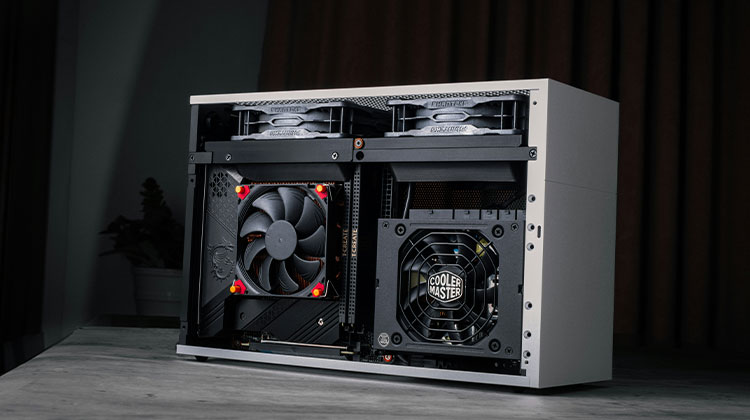
GPU fans mounted on the heatsink of the card are subject to a specific set of criteria before turning on, unlike case fans. GPU problems from high temperatures reduce performance due to heat removal from the device; the fan is turned on.
GPU fans not spinning may be due to many reasons, such as temperature thresholds, workload requirements, and GPU fan curves that prevent the fans from spinning efficiently. Beyond that, the hardware issues, such as wire obstruction, poor power supply, or a failed motor, can be the reason the GPU fans not spinning.
This article explains the reasons and solutions for GPU fans not spinning.
Exploring The Common Reasons GPU Fans Stop Spinning
There are many reasons that your GPU’s fan not spinning, including:
GPU Loads
In the past 10 years, smart fans have been integrated into GPU design to help more efficient workloads carried out by PC. One common feature of all GPUs is having an optimal behavior when they are not in use.
After a specific time starting up, the GPU fans start to decrease their RPM until they stop completely. This does not suggest a problem with the GPU fans not spinning properly, but rather that the GPU reduces the tasks it must perform when idle to save power, and also slightly reduces the endurance of the fans.
Unplugged Power Cables
Moving beyond the programming is where the hardware’s faults begin to show up. The fans that are connected to the heatsink of your GPU are daisy-chained and connected to the PCB in a manner as follows:
This design creates one point of failure if the GPU fans not spinning. The verification process involves returning the graphics card’s manufacturer to ensure a proper diagnosis.
Also read: Why is My CPU Overheating and How to Fix It
Dust Accumulation
Dust accumulation in hardware crevices can cause parts to slow down and stop functioning. Although dust particles aren’t harmful to the hardware, a substantial accumulation of dust blocks airflow, weighs down parts, and, in extreme situations, creates heat pockets that are prone to ignite fires.
Obstructing Wires
The wires that block the path are less harmful to equipment over a short duration. If a wire is bumping or rubbing against fans, the low-pitched buzzing sound of fans striking a wire will be evident after startup.
If not fixed immediately, the long-lasting resistance exposed to the blades eventually causes damage to the motor, which will cause graphics card fans not spinning.
To clear obstructions, shut off the system, and look where the wire is in contact with the fan. If the wiring is connected to the GPU, you can unplug it and redirect it so that it does not affect the fan.
GPU Fan Curve
Graphics card adjustment software PrecisionX1 manages the GPU fan’s profile, allowing the fan control in virtually every configuration. Because of this, the GPU is open to the negative effects of bad configurations, such as thermal throttling.
You can fix this issue by resetting the profile back to default settings or using a different pre-made configuration.
Graphics Driver Issues
Graphics drivers have a certain variation on hardware due to constantly changing firmware. At times, an update could affect how fans function.
In this case, it’s recommended to revert your drivers if the GPU fans not spinning on your system, which causes your GPU failure.
How To Fix GPU Fans Not Spinning
Let’s see how to fix the GPU fans not spinning issue in under 10 minutes.
Checking Power Cables
Examine the PCB connector on the inside for the GPU fan and the power connector for PCIe. Unset connections could be the reason for the problem.
Ensure that the PCIe power cables are in excellent connection to the GPU.
Reseating the GPU
The Motherboard has 75W of power from the PCIe slot. This could be the cause of the problem. Follow the procedure carefully, disconnecting and then reseating your GPU.
When the GPU is back in the slot, check for the results again.
Clean Your GPU Fans
The GPU will allow you to access many parts of the heatsink and fans with dust accumulation. The most likely place where dust settles is within the blades of fans. It can be a reason your GPU fans not spinning.
Using a container of compressed air will get most of the clumps removed, and a rag soaked in alcohol or isopropyl will remove the finer dust layer.
Updating or Rolling Back Drivers
You can upgrade your GPU’s most current functioning driver by using either Nvidia’s or AMD’s driver. It is possible to roll back drivers by searching the window and then clicking the following link: Device Manager > Display adaptor > Right Click to Settings > Drivers > Roll Back Driver
Windows will always have older drivers in case of an installation driver is wrong.
Also read: CTF Loader High CPU & Memory Usage? 5 Easy Fixes for Windows
Adjust the GPU Fan Curve
You can change the fan curve in the settings by choosing any of the available presets or creating your own.
I set the fans to 35-40%, ranging from 30 to 55 degrees Celsius. They will increase up to 60% until they reach the 78-degree mark. Celsius. The fans go up to 90-100 percent between 78-90 degrees as a last attempt to cool the system.
Update GPU BIOS (Advanced Users)
A corrupted GPU BIOS can cause the GPU fans not spinning under load. In general, there’s no need to be concerned over GPU BIOS, but it’s a potential cause of concern and should be included in your list of things to check. It’s important to note for everyone. If you’re not confident in your computer skills, you should consult a professional.
You can also upgrade your GPU’s BIOS. Most likely, you’ll be fine as long as you select the right model and the right manufacturer. Also, ensure you back up your original BIOS so that nothing goes wrong.
Final Thoughts
If you notice GPU fans not spinning, don’t jump to conclusions. In most cases, it’s a normal power-saving feature. Always check temperatures before assuming there’s a problem. Hopefully, this post helps you get the fans spinning with zero issues.
FAQs: GPU Fans Not Spinning
Why do GPU fans spin on startup and then stop?
This is a normal behavior. During startup, GPU fans spin briefly as part of a self-test. Afterward, they stop if the GPU temperature is below the fan activation threshold.
Can a bad power supply cause GPU fans not to spin?
Yes. An insufficient or failing PSU may not provide enough power to the GPU, affecting fan operation, especially under load.
Can dust cause GPU fans to stop spinning?
Yes. Heavy dust buildup can block fan blades, restrict airflow, and strain the fan motor, eventually causing the fans to stop spinning or perform poorly.
Do external GPU coolers work if fans fail?
External coolers can help temporarily, but they are not a permanent replacement for faulty GPU fans.



Leave a comment