






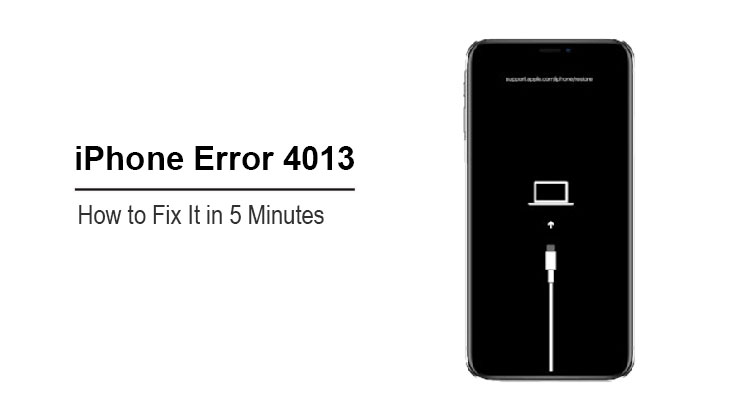
Your iPhone suddenly shows an error code 4013? Can’t you do anything about it? You don’t even know how to fix it.
Well, don’t panic. As an iPhone user, I’ve faced this issue myself. In this blog, I will explain the intricacies of iPhone error 4013 and give you ten simple fixes that have been proven effective by my customers.
What is Error Code 4013?
Error 4013 is an iOS system issue that occurs when restoring or updating has been interrupted. If your iPhone was disconnected from the computer while the iPhone update or restore process was in progress, or if your USB cable is damaged, this error could have occurred. A message will appear on your screen stating that the iPhone cannot be restored.
Error 4013 will also occur if your iTunes does not work properly, for example, if it is outdated or is not supported with the current iOS version on your iPhone. iPhone error 4013 can be caused by software or system issues. It can, however, be caused by a hardware problem.
It’s inconvenient to have an iPhone, but can’t use it. You can’t use your iPhone for anything: chatting, gallery, or games. Check out my solutions for the iPhone error 4013. The solutions are all arranged in a way that makes it easy for you.
What Causes Error 4013?
- Faulty or non-certified Lightning/USB cable
- Outdated Finder/iTunes
- Corrupted iOS firmware
- Insufficient storage or interrupted download
- USB port/computer issues
- Hardware problems (baseband, logic board, Face ID flex—common on iPhone X/11)
Also read: iPhone Call Failed? How to Fix Call Issues in 10 Minutes
How to Fix iPhone Error 4013
Force Restart iPhone
Most random firmware crashes are resolved with a force reset or hard reboot. Error 4013 is not an exception. It can be fixed by forcing your iPhone to restart. Then, check to see if your phone still has enough power. If the iPhone does not have enough battery, go ahead and force-restart the phone while charging.
Factory Reset iPhone
A factory reset of your iPhone can fix the iPhone error 4013. Before you try anything, you need a backup of your important files, since this method will erase all data from your iPhone.
Restore Your iPhone
You still see the iPhone error 4013 after multiple attempts to fix it? Maybe there’s a problem with the hardware on the computer to which you are connecting your iPhone.
Check iTunes Version
iPhone 4013 error is most commonly caused by a software problem. This error could be caused by iTunes bugs that are not resolved and can only be fixed through an update.
If it is a Mac, then:
- Open iTunes on your Mac.
- Click the iTunes icon on the left side of the Apple toolbar.
- Click on Check for Updates. iTunes will automatically update if there are any updates available.
Recovery Mode Restore
If the Error 4013 persists, put your iPhone in iOS Recovery Mode. This mode is a stripped-down version of iOS. This environment is designed to help you restore or update your device by isolating the problematic system files and applications. The device software could be resolved by installing a newer iOS version.
DFU Mode (Advanced)
The recovery mode does not work? If you’re still getting error 4013, then the device firmware update (DFU) is a last resort. This state allows your iPhone’s interface to iTunes, allowing it to be restored correctly.
You should be aware that restoring your iPhone with iTunes after putting your iPhone in DFU mode is a complex process, and you will lose all of your phone’s data.
Change Cable & USB Port
If a USB cable fails during updates or restorations, an error 4013 may occur. If the cable does not work properly, it is possible that your iPhone will be disconnected from iTunes, and your iPhone cannot communicate. My suggestion in such cases is to replace it with a new USB cable.
Also read: Top 5 iCloud Activation Lock Removal Tools in 2025
Clean up Storage
Some iPhone functions may not work if your iPhone runs out of storage space. The iPhone 4013 is also possible. You can fix the problem by clearing storage. Clear some space on your iPhone by deleting the unwanted data and apps. You can also delete data you’ve backed up, such as photos, chats, and apps.
Seek Professional Help
If none of the above works, the error may be hardware-related. Visit Apple Support or a trusted repair center, especially if the iPhone has a baseband, logic board, or Face ID not working.
Conclusion
Now you know the iPhone 4013 error and its cause. Also, you can use various methods to fix this error yourself. It is difficult to diagnose iPhone error 4013 due to its uncertainty. This means that you will have to use a lot of trial-and-error techniques.
FAQs: iPhone Error 4013
Is iPhone Error 4013 a hardware problem?
Not always. Most cases are software-related, but repeated failures may indicate a hardware fault like Face ID flex or logic board damage.
Can I fix Error 4013 without losing data?
Yes. Use the Update option in Recovery Mode first. Data loss happens only if you choose Restore.
Will updating iTunes fix Error 4013?
In many cases, yes. An outdated iTunes version can trigger compatibility errors like 4013.
Can Error 4013 happen on any iPhone model?
Most common on iPhone X, XR, 11 series due to Face ID hardware flex issues.





Leave a comment