






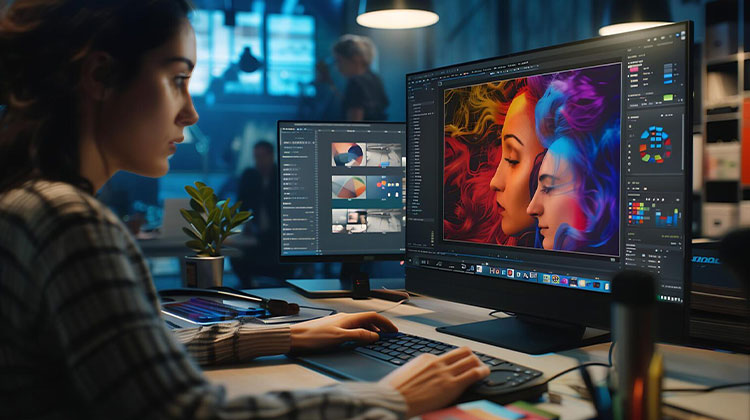
Are you a digital artist or graphic designer? Do you require an efficient raster graphics editor to simplify your work? Don’t look any further, as this article offers the best raster graphics editing software.
A raster graphics editor is an application that allows the creation and editing of graphics and photos and saves them in standard raster image formats like JPEG, GIF, PNG, and more.
It’s a powerful tool frequently used by graphic makers and artists in their day-to-day tasks to design, edit, and retouch images to their preferences.
There are a variety of applications that use raster graphics on the marketplace, most of which are substandard or even average. Therefore, if you’re looking for an effective raster graphics editing software, read this guide.
6 Best Raster Graphics Editing Software
1. InPixio Photo Studio 12 Pro
InPixio is likely the most precise and effective for raster graphics files and photo editing.
The first thing to consider is that raster graphics software is suitable if you’re not an absolute novice. The reason is that you can design and modify your photos with just the click of a button.
Since the Internet is dominated by AI these days, this application is optimized and offers AI-powered photo editing software that looks professional.
Thus, you can utilize the raster graphics elements to create stunning landscape or portrait images.
It’s worth noting that InPixio offers a streamlined interface, with everything in one spot. It’s also possible to work on multiple projects without switching between them.
The conclusion is to invest in professional raster graphics editing software with a simple, fully-featured design to achieve your desired results.
Key Features
- AI-powered photo editing tools
- One-click photo enhancement
- Background removal
- Object removal and photo repair
- Multi-project editing interface
Pros
- Easy for beginners
- AI tools save time
- Clean and simple interface
Cons
- Fewer advanced design tools
- Mostly focused on photo editing
Also read: 10 Best Lightroom Alternatives for Photo Editing in 2025
2. Adobe Photoshop
Adobe Photoshop is probably the most popular raster graphics editor, with an extensive global client base. It is a product from Adobe Corporation, and is compatible with both Windows and Mac.
For many people, Adobe Photoshop is the established standard in photo editing and raster image editing.
It software edits raster image layers and color patterns for all raster image formats, including BMP, JPEG, PICT, PNG, PSD, and TIFF.
It is an extremely customizable and extensible platform, enabled by plug-ins such as Camera-Raw, filters, color correction, 3D effects, and more.
Adobe Photoshop offers many powerful features, including: Paintbrush, 3D extrusion, video editing, Slicing and cropping tools, frames and shapes, Symmetry mode, Clone Stamp, and more.
Key Features
- Advanced layer editing
- 3D tools and effects
- AI-powered tools and filters
- Video editing support
- Clone Stamp, symmetry mode, and advanced brushes
Pros
- Industry-standard software
- Extremely powerful editing tools
- Huge plugin ecosystem
Cons
- Subscription cost
- Steeper learning curve for beginners
3. Corel Painter
Corel Painter, from Corel Corporation, is among the most frequently used raster graphics editing software. Painter is the best Photoshop tool used by thousands of designers, graphic artists, and artists worldwide.
The program is cross-compatible with all Windows and Mac computers. Corel Painter hosts a set of tools that allow users to create stunning photos.
The program is a digital version of the traditional painting toolbox, featuring felt patterns, pens, airbrush, image hose, watercolour sticks, pastel floating pens, thick paint media libraries, and more.
In essence, it was designed to make it easier for creative artists to create art and edit any physical artwork on a computer and a graphics tablet (or mouse).
Other notable features of Painter include a comprehensive user’s manual, an intuitive user interface, color workflow, Wacom tablet compatibility, multi-format file support (PNG, JPEG, and others), reliable customer support, and more.
Corel Painter is offered in two models: Business and Education. The cost of both versions can be obtained through a quotation (custom price). There is also a no-cost trial version of both versions.
Key Features
- Realistic painting simulation
- Thick paint and watercolor tools
- Wacom tablet compatibility
- Large brush libraries
- Multi-format file support
Pros
- Perfect for digital painting
- Highly realistic brush engine
- Excellent tablet support
Cons
- Expensive software
- Not ideal for photo editing tasks
4. Corel PaintShop Pro
Corel PaintShop Pro, fondly known as PSP, is a highly-rated raster graphics editing software designed specifically for Windows computers.
But, PaintShop Pro is not only a raster graphics editing software but also a vector graphics editor. This makes it an all-rounder program, making it among the most popular alternatives for digital artists worldwide.
PaintShop Pro’s initial design was not created by Corel; it was acquired from a middle-class technology firm in 2024.
The program has undergone many changes since its inception, and today. It’s the most effective raster graphics editing software.
PaintShop Pro hosts the latest technologies in AI (Artificial Intelligence) technology, as well as 360-degree editing and more. It also includes 4K customer support and a free trial.
It also includes Paintbrush Auto-save, Paintbrush, Swift image cropping, Vintage tools, Pic-to Painting presets, photo restoration, Layers, Masks, and Filters for images, sharing media (via social media integration), and many more.
Key Features
- AI-powered editing tools
- 360-degree photo editing
- Photo restoration tools
- Layers, masks, and filters
- Social media sharing integration
Pros
- One-time purchase option
- Powerful editing features
- Good Photoshop alternative
Cons
- Only available for Windows
- Interface can feel complex
5. GIMP
GIMP-GNU Image Manipulation Program is among the most popular raster graphics editing software available and has been for over 20 years. It’s compatible with all major operating systems for computers.
GIMP is designed specifically to ease the process of editing images or photos. It can alter any type (format) of image and can also convert photos from one format to another.
This is ideal for quickly editing images because virtually all image formats are supported.
GIMP comes with a Watercolors chooser, HSV color selector, Paintbrush, Airbrush, Bucket fill, Blend tool, Smudge tool, Clone tool, Burn tool, and Dodge tool, multilayer support, 150+ image filters, and much more.
More advanced features comprise the Animation application (plug-in), Resynthesizer (plug-in), Unsharp Mask tool, support for Multi-formats Extensions for color management (Inkscape Scribus and Inkscape Scribus), and much more.
GIMP is an open source application that was developed under the GNU General Public License (GPL). This means that it is accessible to everyone.
Key Features
- 150+ image filters
- Advanced color correction tools
- Layer editing and masks
- Extensive plugin support
- Multi-format image compatibility
Pros
- Completely free and open source
- Powerful editing tools
- Cross-platform (Windows, Mac, Linux)
Cons
- Interface not very beginner-friendly
- Requires plugins for some advanced features
Also read: 10 Best CapCut Alternatives for Video Editing in 2025 (Free & Paid)
6. Artweaver
Artweaver completes our list of the top raster graphics editing software. It’s comparable to Adobe Photoshop and Corel Painter in terms of capabilities.
It also provides exclusive support only for Microsoft Windows. However, it is also used on Linux PCs.
Similar to Corel Painter, Artweaver includes traditional painting tools and a variety of color management and image editing features, including airbrushes, paintbrushes, oil paint effects, and photo filters like mosaic, emboss, and blur.
Additionally, Artweaver houses support for nearly all image file formats, but with limited layer support.
The software supports the magic wand, lasso, pen tablet, and custom palettes, color themes, multi-core CPU support, a user-friendly interface, a dedicated helpline, and more.
Artweaver is a freemium software offering a free version for personal use, and an enhanced commercial edition designed for professionals and business owners.
Key Features
- Realistic brush tools
- Airbrush and oil paint effects
- Photo filters (blur, mosaic, emboss)
- Magic wand and lasso selection tools
- Multi-core CPU support
Pros
- Free version available
- Excellent for digital painting
- Simple user interface
Cons
- Limited layer capabilities
- Mostly available for Windows
Comparison of the Best Raster Graphics Editing Software
| Software | Price | Key Strengths | Best For | Platforms |
|---|---|---|---|---|
| InPixio Photo Studio 12 Pro | Paid (Free trial) | AI-powered photo editing, background removal, simple interface | Beginners and quick photo enhancement | Windows |
| Adobe Photoshop | Subscription | Advanced layer editing, AI tools, plugins, professional image editing | Professional designers and photographers | Windows, macOS |
| Corel Painter | Paid | Realistic painting brushes, digital art tools, tablet support | Digital painters and illustrators | Windows, macOS |
| Corel PaintShop Pro | Paid (One-time purchase) | AI editing tools, photo restoration, layers and masks | Advanced photo editing users | Windows |
| GIMP | Free (Open source) | Powerful editing tools, plugins, multi-format support | Budget users and developers | Windows, macOS, Linux |
| Artweaver | Free & Paid | Realistic brushes, painting tools, simple UI | Digital painting beginners | Windows |
Final word
This article offers the top raster graphics editing software on the market. They are simple to use, with Windows compatibility and a client base, and are affordably priced.
If you’re an artist or graphic designer, or simply an artist, you can use one of these raster graphics editing software to streamline your workflow and increase efficiency.
FAQs: Raster Graphics Editing Software
What is raster graphics editing software?
Raster graphics editing software is a tool used to create and edit pixel-based images such as photos and digital artwork. Popular examples include Adobe Photoshop and GIMP.
Can beginners use raster graphics editing software?
Yes, beginners can start with easy tools like InPixio Photo Studio 12 Pro or Artweaver, which offer simple interfaces and basic editing features.
What file formats do raster graphics editors support?
Raster editors commonly support JPEG, PNG, GIF, BMP, and TIFF image formats.
Which is the best raster graphics editor software for professionals?
Adobe Photoshop is widely considered the best raster graphics editor for professionals due to its advanced tools and features.





Leave a comment