






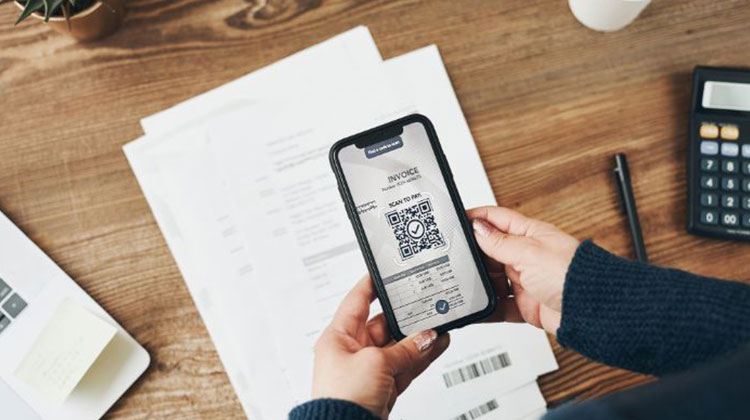
Receipt scanner apps are exactly what they are: they allow you to scan and digitize receipts from paper so that you can keep copies for your accountant, bookkeeper, and even yourself.
Additionally, you can use the receipt scanner apps to track employee expenses -these apps help your employees to upload travel, meal, and other business receipts. This means you will save time searching for receipts and instead spend time developing your business.
Are you ready to begin using the Receipt Scanner app? Here is a quick overview of the best receipt scanner apps for small-scale entrepreneurs:
Benefits of Receipt Scanner Apps
Receipt scanners on smartphone apps allow you to snap pictures of receipts and upload data directly to the cloud. There are many advantages to using this secure, easy, and intelligent technology
- Using mobile receipt scanning solutions can make things like filing expense reports more convenient for remote employees and those who work off-site for clients.
- These best receipt scanners integrate seamlessly with accounting software, helping you to keep track of your receipts.
- Receipt scanners create separate entries for all of the items on your receipts.
- Receipt scanner software reduces the storage space you need for essential documents. In addition, by storing your receipts in a digital format, you will be able to access your documents with high resolution, and the IRS or colleagues, and your accountant, will not raise concerns.
5 Best Receipt Scanner Apps for Small Businesses
Are you ready to pick the best Receipt scanner app for your small-scale business? We’ve put together an overview that includes the top 5 Receipt scanner apps for 2026 to help you narrow down your choices.
These receipt scanning apps have been evaluated by experts based on their ease of use, prices, features and scanning capabilities. Explore the following to discover the best solution for your individual requirements and budget!
1. Relay
Here at Relay. We’re building a complete financial command center that is designed for small and mid-sized companies. This means integrated receipt management, which you already use for your banking.
Relay’s receipt management takes the hassle out of receipts by centralizing receipt collections in one place and keeping your system ready for audits. Stop chasing team members around for receipts and begin recording them as soon as a purchase is made.
Pros:
- Built for teams—employees can upload receipts instantly
- Custom receipt policies
- Fully integrated with banking (no third-party tools needed)
- Supports paper and digital receipts via upload, email, or forwarding
Cons:
- May not suit users who prefer separating banking and receipt tools
Also read: 8 Best Recurring Billing Software
2. Zoho Expense
Zoho is a comprehensive app that allows you to track mileage, organize expenses, and record receipts. With several plans depending on your business size and budget, it’s among the best receipt tracking apps available. It can be used in more than 12 languages, including English, and currencies beyond USD.
To use Zoho Expense, simply snap a photo of your receipt using the app. Zoho uses OCR software to scan the receipt and assign it to an associated expense.
Pros:
- Automated receipt scanning with OCR
- Integrates with Zoho Books, QuickBooks, and Xero
- Cloud storage support
- Email receipt forwarding
Cons:
- Free plan limited to three users
- 5GB storage limit on free plan
3. QuickBooks Online
QuickBooks Online has an integrated receipt scanner. It can be used to take receipts and then add them to your database. QuickBooks also comes with the ability to email any receipt to your accounting software.
To take advantage of QuickBooks receipt scanning, simply install their mobile app. You’ll be able to scan your receipts from home or on the go and then attach them to transactions in the future.
Pros:
- Seamless integration with accounting workflows
- Automatic expense categorization
- Matches receipts to existing transactions
Cons:
- No free plan
- Basic plan limited to one user
4. Expensify
Expensify uses the SmartScan feature that makes scanning receipts extremely fast and easy. It can work with more than 150 currencies. In addition, the app automatically generates expenses at the end of each trip that can be sent to a finance manager or an accountant.
SmartScan is extremely simple to use. Open Expensify’s app when you’re on the move and take a picture of the receipt. Expensify will show them the merchant, purchase date, expense date, and purchase amount right there.
Pros:
- Fast and accurate SmartScan technology
- Expense reports and analytics
- Cloud storage and integrations
Cons:
- Limited features in the free plan
5. Wave
Wave’s app is multifaceted, with the “Receipts” tab being incredibly user-friendly and quick to use. If you’re looking for a variety of options within just one app, Wave is a great option. In addition, Wave supports mobile scanning, desktop uploads, and email receipts.
In the app, click the “Receipts” tab and take an image of the receipt. There’s the option to choose to take a photo of a standard receipt or a “long receipt”, where you can link multiple pictures together to create longer sheets of paper.
Pros:
- Unlimited receipt scanning and bulk uploads
- Email receipt forwarding
- Available on desktop and mobile
Cons:
- No free plan
- Does not sync directly with existing transactions
Also read: Top 10 Mobile Payment Apps for Small Businesses
Comparison of the Receipt Scanner Apps for Small Businesses
| App | Best For | Pricing | Key Features | Limitations |
|---|---|---|---|---|
| Relay | Small & mid-sized teams | Free plan available | Banking + receipt management, team uploads, audit-ready storage | Not ideal if you want standalone receipt app |
| Zoho Expense | All-in-one expense tracking | Free + up to $9/user | OCR scanning, mileage tracking, accounting integrations, multi-currency support | Free plan limited to 3 users & 5GB storage |
| QuickBooks Online | Accounting & bookkeeping | Starts $24/month | Receipt capture, auto expense matching, accounting integration | No free plan, limited users on basic plan |
| Expensify | Fast receipt scanning & travel expenses | Free (25 scans) + $4.99/month | SmartScan OCR, multi-currency support, expense reports | Free plan is limited |
| Wave | Freelancers & small businesses | $8/month or $72/year | Unlimited scanning, email uploads, mobile + desktop support | No free plan, no direct transaction sync |
Final Word
Converting paper receipts to digital receipts could help you track expenses more easily. With many apps that can automate the transfer of receipts into expense reports, the business trip you are planning can be streamlined. The needs of your business and the time and location you want to use it will determine the receipt scanner software that best suits your needs. Test a few apps to see which is best for your needs.
FAQ: Receipt Scanner Apps
Are receipt scanner apps safe to use?
Yes, most reputable receipt scanner apps use cloud encryption and secure storage to protect your financial data. Apps like QuickBooks, Zoho Expense, and Expensify follow industry-standard security practices.
Can receipt scanner apps integrate with accounting software?
Yes. Many apps integrate with tools like QuickBooks, Xero, Zoho Books, and other accounting platforms, making bookkeeping and tax filing much easier.
Can employees upload receipts using these apps?
Yes. Many receipt scanner apps allow team access, so employees can upload receipts for travel, meals, and business expenses directly from their phones.
Do receipt scanner apps support multiple currencies?
Yes, several apps like Expensify and Zoho Expense support 150+ currencies, making them ideal for international business travel and global teams.









Leave a comment