






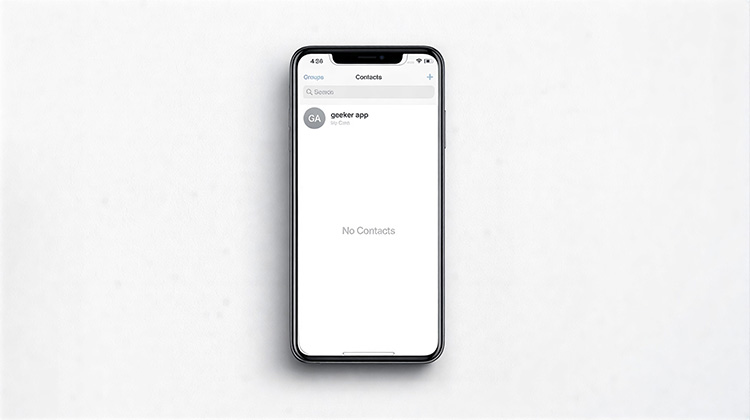
Smartphones are the latest trend, particularly since they can be utilized for a variety of purposes. But their primary use is in aiding communication. We are all aware that phone numbers must be present so that you can connect with the appropriate people. What happens if your iPhone contacts missing when making an important phone call?
It is advisable to know the reasons for my iPhone contacts missing. You may have lost your contacts due to an iOS update, accidentally deleted them, or a malware attack, or even an attempt to jailbreak your iPhone.
The development of modern technology makes it possible to fix iPhone contacts missing problems in just a few minutes. These tips could be useful at a crucial time.
How to Fix iPhone Contacts Missing Issue
1. Sync Contacts from iCloud
iCloud can automate backups of data as long as you’ve enabled syncing of your data. If you find iPhone contacts disappeared, go to the Settings icon on your iPhone, then click on iCloud. You’ll need to sign in using your iCloud account user name and password. After that, slide the toggle to your contacts until it is turned off. This will refresh your contact list. It should take approximately 10 seconds, then activate contacts by sliding the toggle a second time. And disappeared contacts will appear again.
Also read: Top 5 iCloud Activation Lock Removal Tools in 2025
2. Force Restart Your iPhone
This tip has helped many users recover missing contacts from iPhone. Restarting your iPhone will allow it to recover its memory within only a couple of minutes. Different iPhone models have their own particular format for restarts.
The most common method to get back missing contacts from your iPhone is to use the buttons on your screen. Press and hold the ‘Power’ and Home buttons simultaneously until you see the Apple logo appear on the iPhone’s screen. evident. Release the 2 buttons after you’ve seen the Apple logo, and you will be able to see your contacts again.
3. Sign Out of iCloud and Sign Back In
iCloud is an extremely effective way to back up data. After you’ve signed up for iCloud, the account will keep most of the data from your iPhone settings. Utilizing this method, signing out of iCloud helps in refreshing backup memory. Disappeared iPhone Contacts are retrieved when you sign out of iCloud and then back in.
Begin by scrolling down the Settings menu. After that, tap the Apple ID name, then tap ‘Sign out’. Take around a minute before clicking Sign In to iCloud account. You will need to enter your password and username to log in. Once you’ve done that, review your contacts for access to those that were previously missing.
4. Toggle Contacts in Default Email Account
The default email, in this instance, is the email address you used to set up your iPhone during the initial setup process. You can solve the iPhone contacts missing problem by deactivating contacts from this email account. Click on ‘Settings’, then choose Contacts. Then, click on your default account and disable contacts. Take approximately 10 seconds and then toggle the contacts again. The missing contacts will be resurfacing at some point.
5. Restore Missing Contacts from iTunes Backup
Most iPhones automatically sync with iTunes when there’s access to the internet. This allows you to access any lost data and iPhone contacts missing. To restore lost contacts using this method, begin by connecting the iPhone to your PC. iTunes will open automatically within some minutes.
On your computer’s screen, go to the left-hand corner and then click on the phone icon. Select ‘Settings’ and then choose “Summary”. After that, select the option to restore the backup. There will be a drop-down menu that will display various data. Choose ‘Contacts’, then click the button ‘Restore. Then the iPhone contacts missing will be shown again.
6. Refresh Contacts Database by Editing a Contact
It’s not typical to have all iPhone contacts missing. In general, a few contacts are still available even when you encounter this issue. Utilize any of these contacts to assist in backing up all others that are missing. Just click on the contact icon to display the available list. Select a contact, then navigate to the “Edit Contact section. Edit the name and save the modifications. This will allow the contacts database refresh itself promptly. Check your contacts list to confirm that the missing contacts have been restored to normal.
Also read: Why Is Face ID Not Working on iPhone? Quick Fixes
7. Use iPhone Data Recovery Software
Using an iPhone Data Recovery software is also an excellent way to help you retrieve missing contacts from your iPhone. So long as you’ve installed this application, just link your iPhone to your computer.
Open the application and choose’recover from your iOS phone’. Begin the search by clicking on the “Scan” button. Seravl data will be accessible, so be sure to click on the “recover contacts” option. You can preview data before recovering. You can select the missing contacts you’d like to restore. But it’s best to restore your entire contacts list. You can recover iPhone contacts missing in a short time.
Final Thoughts
The iPhone contacts missing is a frequent occurrence that can bring you to a deadlock. We have given you simple and effective solutions to resolve the issue of iPhone contacts missing. With all the power at your hand, you can now ensure uninterrupted communication throughout the day. The good thing is that you don’t require any particular method to deal with the issue if your iPhone contacts are missing or disappear. You can simply try the next method if the old method is not working.
FAQs: iPhone Contacts Missing
Why are my iPhone contacts missing suddenly?
iPhone contacts may disappear due to iCloud sync issues, an incorrect contacts account, iOS update glitches, accidental deletion, or poor internet connectivity. In most cases, the contacts are not deleted but temporarily hidden due to syncing problems.
Why did my contacts disappear after an iOS update?
Contacts may disappear after an iOS update due to temporary software bugs or interrupted syncing. Restarting the device or re-enabling iCloud Contacts usually fixes the issue.
How do I recover deleted contacts on iPhone without backup?
Deleted contacts can sometimes be recovered without a backup by using trusted iPhone data recovery software that scans your device and retrieves lost contact data.






Leave a comment