


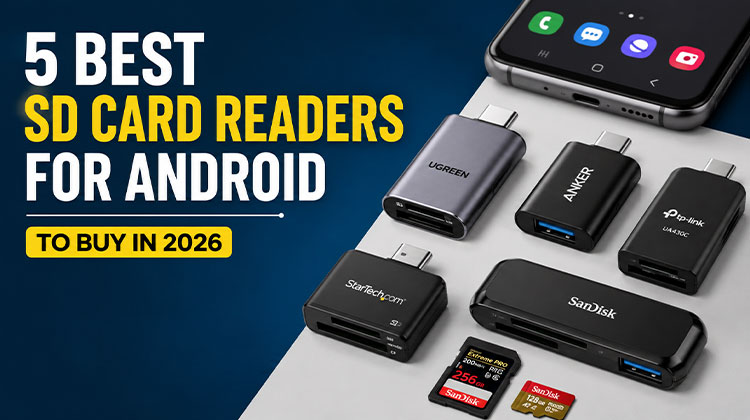
Are you a photographer dealing with multiple SD cards filled with photos? Or maybe you’re a student who uses SD cards to store important files and documents? An SD Card Reader for Android can make accessing those files much easier.
In this guide, we compare five SD Card Reader for Android for different needs, from everyday file transfers to professional photography workflows.
Top 5 SD Card Reader for Android in 2026
1. TP-Link UA430C — Best Overall
The TP-Link UA430C is one of the most versatile choices if you want a simple SD card reader for Android phone. It uses USB-C and includes separate SD and microSD slots, making it suitable for cameras, drones, action cameras, and other devices that use removable storage.
TP-Link says the UA430C supports SD, SDHC, SDXC, microSD, microSDHC, and microSDXC cards up to 2TB. It uses USB 3.0 with speeds up to 5Gbps and supports UHS-I cards with advertised read speeds of up to 200 MB/s under compatible conditions.
Key Features
- USB-C connection
- SD and microSD card slots
- Supports cards up to 2TB
- USB 3.0 with up to 5Gbps interface speed
- UHS-I support
- Advertised read speeds up to 200 MB/s
- Android compatibility
- Compact aluminum design
- Can access SD and microSD cards simultaneously
The braided 150mm cable is also useful because it gives your phone a little more flexibility than a rigid adapter.
Best for: Users who want an all-around SD card reader for Android phone use.
Also read: Best Photo Scanner Guide: Pick the Right One 2025
2. Anker USB-C 2-in-1 Card Reader — Best for Everyday Use
If you prefer something compact and straightforward, the Anker USB-C 2-in-1 Card Reader is worth considering. It provides dedicated SD and microSD slots in a small USB-C design.
Anker’s specifications list an SD 3.0 UHS-I slot and a microSD 4.0 UHS-I slot.
That makes it the best SD card reader for Android phones for people who frequently move photos and videos from cameras, drones, or memory cards to a USB-C Android phone or tablet.
Key Features
- USB-C connection
- Dedicated SD slot
- Dedicated microSD slot
- UHS-I support
- Small and portable design
- Useful for everyday file transfers
The main advantage here is simplicity. You don’t need a large hub if your only goal is to access an SD or microSD card from your phone.
Best for: Everyday users looking for a compact Android SD card reader.
3. UGREEN USB-C SD Card Reader – Best for Easy File Transfers
The UGREEN USB-C SD Card Reader is a practical choice for Android users who want to transfer photos, videos, and other files directly from a memory card. Its USB-C connection makes it compatible with Android phones, tablets, and other USB-C devices.
It is a good option for users who need a simple and portable reader for everyday file transfers without carrying a larger card reader or hub.
Key Features
- USB-C connection
- SD and microSD card support
- Fast data transfer
- Compact and portable design
- Easy to use with compatible Android devices
- Suitable for photos, videos, and documents
Best for: Android users looking for a compact USB-C SD card reader for Android for everyday file transfers.
4. StarTech USB-C Multi-Card Reader — Best for Different Card Formats
If you work with several types of memory cards, the StarTech FCREADU3C is a more specialized option.
It supports SD/MMC, microSD/TF, and CompactFlash cards. The reader uses USB 3.2 Gen 1 with a maximum interface speed of 5Gbps and is listed as compatible with Android.
Key Features
- USB-C connection
- SD/MMC support
- microSD/TF support
- CompactFlash support
- USB 3.2 Gen 1
- Up to 5Gbps interface speed
- Android compatibility
- Portable aluminum housing
This can be especially useful for photographers or content creators who work with different cameras and memory card formats.
Best for: Photographers and creators who need a multi-format microSD card reader for Android and other devices.
Also read: 5 Best SD Card Repair Tools to Fix Corrupted Cards
5. SanDisk ImageMate PRO USB-C — Best for High-Speed Workflows
For users who prioritize performance and broad card support, the SanDisk ImageMate PRO USB-C is an interesting option.
SanDisk says the reader supports SD and microSD cards, including UHS-II and UHS-I cards, as well as CompactFlash. The company lists speeds of up to 312 MB/s for SD and microSD and up to 160 MB/s for CompactFlash under suitable conditions.
Key Features
- USB-C connection
- SD and microSD support
- UHS-II and UHS-I support
- CompactFlash support
- USB 3.0 interface
- Up to 312 MB/s advertised SD/microSD speed
- Backward compatibility with USB 2.0
This is more than most casual Android users need, but it can make sense if you regularly work with large photo or video files.
Best for: Creators who need high-speed memory card transfers and broad card compatibility.
Quick Comparison: 5 Best SD Card Readers for Android
| SD Card Reader | Best For | Connection | Card Support | Key Feature |
|---|---|---|---|---|
| TP-Link UA430C | Best Overall | USB-C | SD + microSD | Up to 200 MB/s read speed |
| Anker 2-in-1 Card Reader | Everyday Use | USB-C | SD + microSD | Compact and portable |
| UGREEN USB-C SD Card Reader | Easy File Transfers | USB-C | SD + microSD | Simple and convenient |
| StarTech FCREADU3C | Multi-Card Users | USB-C | SD + microSD + CF | Multiple card formats |
| SanDisk ImageMate PRO | High-Speed Transfers | USB-C | SD + microSD + CF | Up to 312 MB/s read speed |
How to Choose the Best SD Card Reader for Android?
Before buying an SD Card Reader for Android, ask these important questions to find the right option for your phone and memory card.
- Check the phone port: USB-C or Micro-USB.
- Check card support: SD, microSD, or both.
- Check transfer speed: Prefer USB 3.0 or faster.
- Check OTG support: Make sure your Android supports USB OTG.
- Choose portability: Pick a compact reader for travel.
- Check Compatibility: Ensure the reader works with your Android version.
Final Verdict
The right SD Card Reader for Android can make file transfers faster, easier, and more convenient. For most users, a reliable USB-C model with SD and microSD support is the best choice. Pick one that matches your phone, card type, and speed needs for smooth everyday transfers.
FAQs: SD Card Reader for Android
Can I connect an SD card directly to an Android phone?
Yes. If your Android phone supports USB OTG or USB host functionality, you can generally connect a compatible card reader through its USB port.
What is the best SD card reader for Android?
The TP-Link UA430C is a strong overall choice because it offers USB-C connectivity, separate SD and microSD slots, UHS-I support, and Android compatibility.
Do I need an OTG adapter for an SD card reader?
Not always. If your phone and reader use compatible USB-C connections and your phone supports USB host functionality, you may be able to connect the reader directly. Older phones with different ports may require an OTG adapter.
What is the difference between an SD card reader and a USB-C card reader?
An SD card reader reads memory cards, while a USB-C card reader uses a USB-C connection to connect the reader to a phone or other device.




Leave a comment