






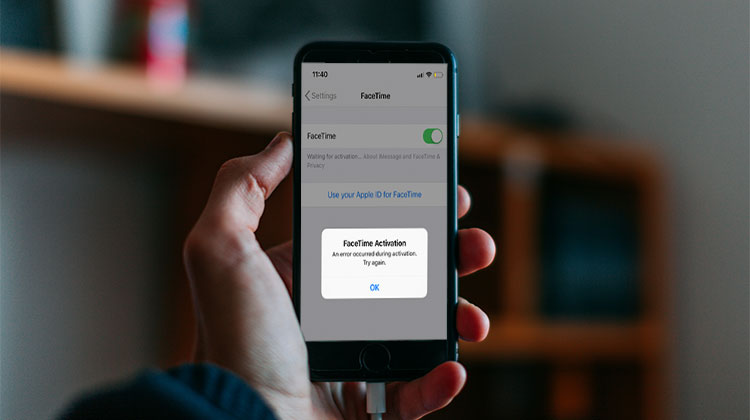
A recent iOS user posted a problem about FaceTime on Apple’s forum. A user stated, “FaceTime is not activating and not responding to the suggested fixes.” Most users have reported that this issue was caused by the iOS 16/15 update. In this blog, discusses the cause and solution to fix FaceTime waiting for activation. You can read the blog to find solutions if you are facing FaceTime waiting for activation.
Why Does FaceTime Say Waiting for Activation?
The FaceTime waiting for activation message means that there is either a problem with the Apple ID or your device is not configured properly. Facetime Activation Failed can be caused by a lot of factors.
Common reasons include:
- Weak or unstable internet connection
- Incorrect date & time settings
- Carrier activation issues
- Apple ID problems
- iOS bugs or outdated software
- SIM card or SMS activation failure
Also read: iPhone Call Failed? How to Fix Call Issues in 10 Minutes
How to Fix FaceTime Waiting for Activation Error on iPhone
It may take a while to wait for Apple’s contact to activate FaceTime. FaceTime activation errors can be caused by system glitches or bugs on the iPhone. Try these solutions to resolve the FaceTime Waiting for Activation problem.
1. After 24 hours, try again
Apple will activate FaceTime after 24 hours. You will need to check Apple’s System Status page after 24hours. Apple’s System Status page may show yellow or even green if your FaceTime activation is still having problems.
2. Check Network Connection
FaceTime activation requires a fast and stable network connection. Any disruptions to your Wi-Fi connection or cellular data can cause activation problems. This issue can be resolved quickly by ensuring that your device is connected to the internet.
3. Turn off and restart FaceTime
FaceTime can sometimes be turned on and off to fix this issue. It’s worth trying all the methods if you aren’t sure which one will work.
- Go to Settings
- Click on FaceTime
- FaceTime can be turned off by clicking the toggle button.
- FaceTime will be available in a few seconds.
4. Make Sure SMS Is Enabled on Your SIM
FaceTime activation uses a silent international SMS. If SMS services are blocked or you have no balance, activation will remain stuck.
- Ensure SMS sending is enabled
- Check SIM balance or active plan
- Disable SMS blocking apps
- Contact your carrier if needed
5. Update the iOS system
FaceTime will often wait for activation on older iOS versions. Updating your iOS version is always a great way to fix a lot of problems at once.
- Go to Settings
- Tap General
- Select Software Update
- Download and install the latest update
6. Check Apple System Status
Apple’s servers are having problems or are down in some cases. This may be FaceTime waiting for activation. Apple’s System status page will help you determine if the problem is yours or a server issue on Apple’s side. You can still wait for the Apple server issue
Also read: Top 5 iCloud Activation Lock Removal Tools in 2025
7. Contact SMS Carrier
Your carrier service may not deliver your activation message on time or hold it. Contact your SMS service provider and inform them about your problem.
8. Contact Apple Support
Apple Customer Support is rarely contacted to inform them about activating iMessage. Apple’s customer service representative can help fix the issue.
Summary Up
FaceTime waiting for activation error can be caused by several problems, including a bad internet connection, an iOS bug, an outdated iPhone version, and many others. We’ve covered the problems and solutions in this blog that will help you remove this issue.
FAQs: FaceTime Waiting for Activation
Can FaceTime activate without a SIM card?
Yes, FaceTime can activate without a SIM card on iPad and Mac using an Apple ID email. However, iPhones require a SIM card to activate FaceTime with a phone number.
Can VPN cause FaceTime activation issues?
Yes, using a VPN can block Apple’s activation servers and prevent FaceTime from activating. Disabling the VPN during activation often fixes the issue.
What should I do if FaceTime activation fails after 24 hours?
If FaceTime still shows “Waiting for Activation” after 24 hours, contact Apple Support or your mobile carrier to check account or SMS activation issues.
Why is my phone number not showing in FaceTime settings?
Your phone number may not appear due to SIM issues, network problems, or Apple ID errors. Ensure your SIM is active, SMS is enabled, and you’re signed into iCloud correctly.







Leave a comment