






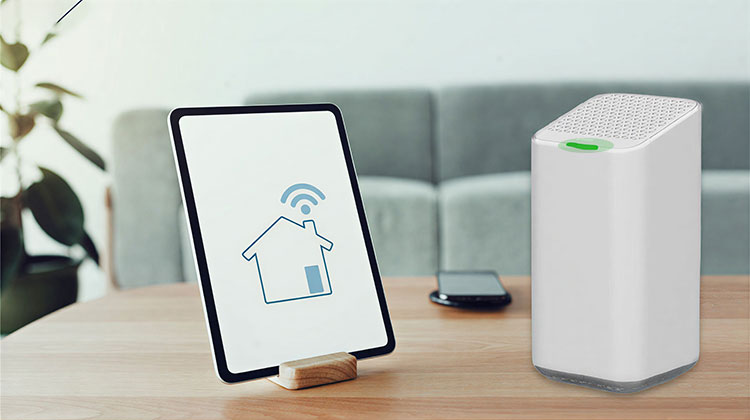
If you want to understand the different lights blinking on your Xfinity router, it is important to ensure that you are aware of what each light signifies. This will help you gain an understanding of how to control the lights on your Xfinity device and will help you run solutions to any issues.
While a green light is generally a good sign, blinking a green light in your Xfinity router could indicate something completely different. We explore in this blog why my Xfinity router blinking green light. Let’s figure it out:
What Does Green Light On Xfinity Router Mean?
When your Xfinity router blinking green light, it could refer to several different things. This is what it could mean:
- There’s a network outage.
- Your gateway isn’t properly configured.
- There’s a problem with the Ethernet cables.
- The network is overwhelmed.
- There’s throttling/ overheating.
- There’s a power failure.
There are a few reasons why my Xfinity gateway blinking green. Also, if your Xfinity router turns green, it indicates that there’s an issue with the internet, regardless of whether the connection has been established.
Also read: What is xFi Complete? Features and Price (2025 Guide)
Common Reasons for Xfinity Router Blinking Green
Router is powering on or restarting
After a reboot, it’s normal for the router to blink green for a few minutes while it initializes.
Firmware updates in progress
Xfinity often pushes automatic firmware updates. During this time, the router may blink green.
Internet service issue
A blinking green light may indicate that the router can’t establish a proper connection due to outages or poor signal.
Hardware or connection problem
Loose cables, damaged ports, or faulty equipment can trigger the blinking green light.
How to Fix Xfinity Router Blinking Green Issue?
If you’ve figured out what might be the reasons behind your Xfinity router blinking green, you can look into some simple solutions to fix the problem:
Restart Xfinity Gateway
As we said, restarting the Xfinity Gateway can solve the problem for most users. In reality, a range of WiFi connectivity issues can be solved simply by restarting the device.
There are several methods for restarting the Gateway. The most effective method is to manually restart.
To do manual restarting, unplug the power cable, then wait for one minute, then plug the power cable back in. Within 15 minutes, you’ll see a steady white light that shows the device is functional.
Check for Ongoing Maintenance
The first thing you should do is call the customer service of Xfinity to determine if an outage or maintenance issue is taking place. ISPs are required to conduct maintenance to ensure their systems and devices are up-to-date.
In these times, it is common for the internet to be down, which could cause you to see your Xfinity modem blinking green. Additionally, it is possible to experience an issue at the end of the line, and you can contact them to get a timetable to fix.
Check for Device Throttling
There are instances where the internet service provider, to fulfill requirements for service, utilizes speed throttling. ISPs use this technique to limit the bandwidth offered to users to satisfy high demands. Sometimes, however, the router may get overloaded due to excessive use or being placed in low-ventilated areas. Relocate the router and be careful not to overload or use the device to determine whether the throttling issue can be solved.
Check for Modem Overloading
While the most recent Xfinity routers are made to deliver the ultimate wifi experience, over-demanding can cause a device to overwork. This is also known as router or modem overloading in the sense that it occurs when your router is executing multiple processes or performing more than one task at a time.
This can cause disconnection/choking since your router isn’t able to cope with the flowing bandwidth, resulting in an Xfinity blinking green light problem. To prevent this from happening, you can alter the band that your router is operating on by changing the frequency to 5 GHz or higher (if there is).
It can resolve the issue by allocating network resources more efficiently while reducing the chance of overloading the modem. If this doesn’t work, it could be a problem with your device, for which you’ll need a replacement.
Check Your Modem’s Configuration
Internet service providers configure their routers to ensure that they function smoothly. This entails setting the DNS and allocating IP addresses, and so on. The most frequent reason for Xfinity’s green lights is a configuration error.
You can look at the settings properties of your router to determine if the configuration of DHCP is correct or not. Additionally, you can use a troubleshooter that will reboot the device automatically and then configure the DHCP.
If you’re operating a company-owned device and the administrator is responsible for it, they are required to set up the DHCP and assign a static IP address to you.
Also read: Xfinity Router Blinking Orange Light: Causes & Quick Solutions
Reconnect Cables
It is not surprising that the coax cable is responsible for the Xfinity box blinking green issues with connectivity to the internet. The first is that the inner pin connector of a coax cable is easily damaged. First, examine the entire coax cable and its pin connector to be sure there aren’t any obvious imperfections.
Also, eliminate any kinks or bends within the cable, since it is known to cause connectivity issues. Then, make sure your coax cable’s connection to the side of the Gateway is secured. Pull the cable into place and tighten the bolt until you notice resistance.
Final Notes
If you now know the reason for the blinking green light on Xfinity modem, it isn’t a major issue because you’ve got solutions to solve xfinity modem blinking issue. Check out these suggestions to fix Xfinity router blinking green problem and restore your internet. If the fixes do not work, or to determine whether there’s an outage, contact Xfinity customer support.
FAQs: Xfinity Router Blinking Green
Is blinking green light normal on Xfinity modem?
Yes, blinking green is normal during startup or updates, but it should stop once the internet connection is established.
How do I stop my Xfinity router from blinking green?
Restart the router, tighten cables, check for outages in the Xfinity app, and wait for updates to complete.
Can damaged cables cause Xfinity router blinking green?
Yes. A damaged or loose coax or Ethernet cable can prevent proper connection and cause the green light to blink.
Why is my Xfinity router blinking green at night?
This often happens due to automatic firmware updates or scheduled network maintenance by Xfinity.




Leave a comment