






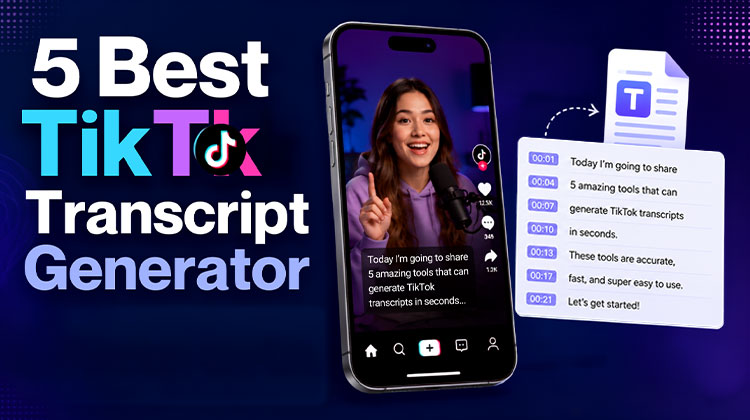
You’re interested in the full TikTok transcript of the viral TikTok video to examine the premise. Repurpose the video or find an example for your next blog post. However, TikTok does not allow you to take captions directly within the app.
This is the point where a TikTok transcript generator is available. These tools can take any TikTok or YouTube URL and provide the complete spoken content as exact text in just a few seconds, with no manual typing, no video scrubbing, and no requirement to download video files.
Most are AI-powered with speech recognition, built specifically for short-form video audio, rather than software for dictation. They can be used with TikTok hyperlinks, Instagram Reels, and YouTube Shorts links.
We compared the best free options in 2026. Here are the top five TikTok transcription generator tools and what each is best for.
Why Use a TikTok Transcript Generator?
TikTok is one of the most popular websites on the web and also one of the most difficult to get value from. In contrast to YouTube or blog posts, TikTok content disappears into scrolls. There’s no way to copy the caption or cite a quote. It is impossible to study a competitor’s hook without having watched the video several times.
The TikTok transcript generator will solve this issue in just a few seconds. Copy the URL of the video. You will receive the complete spoken content in precise text. Make transcriptions immediately for any workflow in the content creation.
Content Repurposing
Transform a 60-second TikTok video into a blog post, email newsletter or Twitter thread – without having to rewrite the content from scratch. Content creators can use video transcripts to reuse spoken content in just minutes.
Competitor Research
Bookmark the TikTok links for 5-10 of the top performers in your area, and then translate TikTok video clips from each and evaluate the opening hooks, problem framing, and CTAs one-to-one.
Accessibility
Convert spoken information into precise text for hard-of-hearing and deaf viewers, and increase watch time.
Learning and Research
Take key information from instructional TikToks, tutorials, and expert interview videos without having to watch them again.
Translation
Translate viral TikToks in other languages to English. You can also translate your content into different markets by translating the video’s transcription.
SEO Content Creation
Use video transcripts as the basis for blog posts with keywords. Converting TikTok audio content to text offers content creators a fast way to create SEO-friendly content that ranks for the same subjects.
Also read: 5 Best VPN for TikTok to Bypass Bans and Restrictions
Best Free TikTok Transcript Generators 2026
1. TokScript — Best Overall for Short-Form Video Research
TokScript is designed specifically around short-form video transcription and research. It supports TikTok and other short-form platforms, making it useful for creators who work across TikTok, Facebook Reels, and YouTube Shorts.
The free version can be useful for occasional transcription, while heavier users can access additional functionality through paid plans. Current information from TokScript indicates that its free access includes a limited number of transcripts, with additional features available on paid plans.
Key features
- TikTok, Reels, and Shorts support
- No sign-up for basic use
- Searchable transcript workflow
- Options for larger-scale research on paid plans
- Useful for creator and competitor research
Pros
- Built specifically for short-form content
- Supports multiple platforms
- Useful beyond one-off transcription
- Suitable for content research
Cons
- Free usage is limited
- Advanced research features require paid access
Best for: Creators and marketers who regularly study short-form videos.
2. Saveto AI — Best for Multiple Languages
Saveto AI is a strong option if language support is important to you. Its current website says the tool supports more than 200 languages and can generate transcripts without requiring an account. It also offers features such as summaries, key points, and timestamps.
For creators working with international content, this can make a free TikTok transcript generator more useful than a tool focused only on English-language videos.
Key features
- 200+ claimed language support
- No sign-up required
- TikTok and other video platforms
- Summaries and key points
- Timestamp support
Pros
- Very broad language coverage
- Simple URL-based workflow
- Useful for international content
- Additional AI features
Cons
- Accuracy can vary with audio quality
- Advanced workflows may require more processing or editing
Best for: Users who need to transcribe TikTok content in different languages.
3. SocialPlug — Best for Simple Transcription
SocialPlug takes a straightforward approach. Paste a public TikTok URL, generate the transcript, and use the resulting text for your project.
Its current tool is positioned as a free TikTok Transcript Generator and does not require users to create an account for basic use.
If you simply want to transcribe TikTok videos without needing a large research dashboard or complicated editing features, a simple tool can be enough.
Key features
- TikTok URL transcription
- Free access
- No sign-up for basic use
- Works across desktop and mobile
Pros
- Simple workflow
- Beginner-friendly
- Useful for one-off transcripts
- No complicated setup
Cons
- Fewer advanced features
- Better suited to individual videos than large research projects
Best for: Users who want a quick and uncomplicated transcription process.
4. Transcript24 — Best for Quick Research
Transcript24 is another TikTok Transcript Generator for users who primarily need the text from a short-form video. It can be useful for researching public videos and extracting spoken information without manually typing the dialogue.
Because free limits and supported URLs can change, it is worth testing the tool with your specific TikTok links before making it part of a regular workflow.
Key features
- Online transcription
- Useful for individual videos
- Suitable for content research
- Simple text-based workflow
Pros
- Convenient for quick tasks
- Useful for research
- No complex editing workflow required
Cons
- Feature set may be more limited than dedicated creator platforms
- Current availability and limits should be checked before use
Best for: Users who need occasional transcripts for research or reference.
5. Submagic — Best for Captions and Video Editing
Submagic is slightly different from the other TikTok video transcript options in this list. While it can help turn video speech into text, its bigger focus is short-form video creation, captions, and editing.
That makes it particularly useful when your goal is not simply to obtain a TikTok transcript, but to turn spoken content into polished captions and publish-ready short-form videos.
Current comparisons describe Submagic as a caption-focused tool with a free utility and broader paid video-editing functionality.
Key features
- Automatic captions
- Short-form video editing
- Caption styling
- AI-assisted content workflow
- Video creation tools
Pros
- Useful beyond transcription
- Strong caption workflow
- Suitable for creators who edit videos
Cons
- Not primarily a transcript-research tool
- Some features require paid access
Best for: Video creators who want transcription and caption editing in the same workflow.
Also read: How to Remove TikTok Watermark: 4 Easy & Free Methods
Which TikTok Transcript Generator Should You Choose?
The right TikTok transcript generator depends on what you want to do with the text.
If you need a versatile option for short-form content research, TokScript is a strong starting point. If you regularly work with different languages, Saveto AI is worth considering because of its broad language support. For a straightforward transcription workflow, SocialPlug may be enough.
If your primary goal is video editing and captions rather than research, Submagic makes more sense.
For occasional research, you can also test Transcript24 and compare the output against the other tools before choosing your regular workflow.
How to Get a TikTok Video Transcript
You usually do not need to download the video first.
Open TikTok and find the public video you want to analyse. Tap the share option and copy its link. Open your selected transcription service, paste the URL, and start the process.
After the tool generates the text, read through it before publishing or quoting it. AI transcription can make mistakes with names, technical terms, slang, accents, background music, or overlapping speakers.
Final Verdict
A TikTok Transcript Generator can save considerable time when you need to turn short-form video speech into usable text. The best choice depends on your workflow, not on simply choosing the tool with the longest feature list.
TokScript is the TikTok transcript generator for regular short-form research, Saveto AI stands out for multilingual use, and SocialPlug is suitable for straightforward transcription. Transcript24 can be considered for occasional research, while Submagic is better suited to creators who want transcription alongside captions and video editing.
FAQs: TikTok Transcript Generator
What is a TikTok Transcript Generator?
A TikTok Transcript Generator is an online tool that converts the spoken audio from a TikTok video into written text. You can use the transcript for research, content repurposing, captions, summaries, and note-taking.
Can I get a TikTok transcript for free?
Yes. Several online services offer free TikTok transcription, although they may have limits on the number of videos, video length, or advanced features available.
Can I transcribe TikTok videos without downloading them?
Yes. Many online tools let you transcribe TikTok videos directly from their public URL, so you do not need to download the video first.
Are TikTok transcript generators accurate?
Accuracy varies between tools and videos. Clear speech generally produces better results, while background music, poor audio, accents, slang, technical terminology, and multiple speakers can lead to transcription errors. Always review important transcripts before publishing them.
Do TikTok transcript generators work with every video?
No. A TikTok transcript generator may not work with private, deleted, restricted, or inaccessible videos. Results can also vary depending on the video's audio quality and the tool's compatibility with TikTok.









Leave a comment