





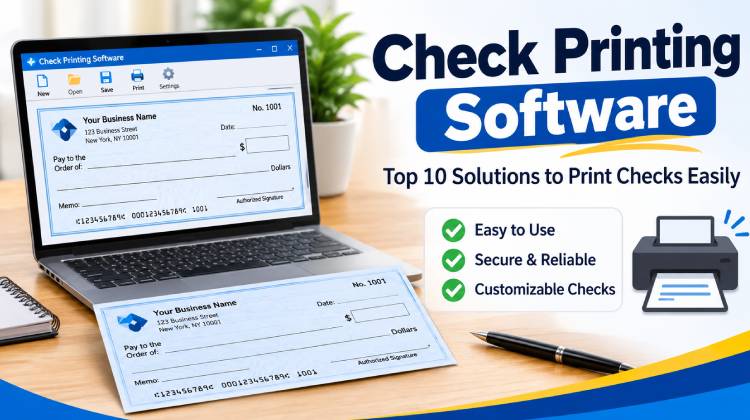
Check printing software is a convenient alternative to the traditional method of writing checks by hand. Although some people consider check writing outdated because of the growing popularity of digital and cloud-based banking, checks remain an important payment method for many individuals and businesses.
You might wonder whether printing your own checks at home is legal. In countries where self-printed checks are permitted, the answer is yes. However, checks must meet applicable banking and security requirements. Special security paper, commonly known as check stock paper, is available online and at office supply stores.
Check printing software is useful for both personal and business purposes. It saves time, reduces manual work, and allows users to customize their checks. Whether you need check writing software for personal payments or a business solution to print business checks, choosing the right tool can simplify payment management.
Let’s explore the top 10 best check printing software solutions, evaluating their features, limitations, ease of use, and overall value.
1. Checksoft
Checksoft is check printing software and comes in three editions: Personal, Business, and Premium. It offers more than 1,000 colorful background images, logos, and graphics to customize your checks. Its user-friendly interface includes a payee database that allows you to enter and save information just once, making future transactions easier.
The software also lets you select transaction types, categorize daily transactions, and generate detailed financial reports. You can even download bank data for convenient financial management. With its range of useful features and customization options, Checksoft makes check printing simple and efficient.
Key Features:
- Three editions: Personal, Business, and Premium.
- More than 1,000 customizable backgrounds and graphics.
- Reusable payee database.
- Transaction categorization and financial reporting.
- Bank data downloads.
Limitations:
- Primarily designed for Windows users.
- Some features may require a paid edition.
- Bank data compatibility may vary.
Also read: Bank Statement Generator: Generate Financial Statements in 5 Minutes
2. ChequeMan
ChequeMan is a reliable, powerful, and user-friendly cheque printing software that requires just five minutes for installation and online registration. Compatible with Windows, it is suitable for businesses of different sizes.
This software allows you to print checks for various expenses, including salaries and rent, and also supports EMI generation. It provides detailed reports of canceled checks and offers bulk printing to save time and effort. For enhanced security, ChequeMan includes password protection to prevent unauthorized access.
Key Features:
- Quick installation and online registration.
- Bulk check printing.
- EMI generation.
- Canceled-check reports.
- Password protection.
Limitations:
- Primarily designed for Windows.
- Advanced features may require higher editions.
- Accounting integration options need verification.
3. Chequepro
Chequepro is a versatile check printing software designed to work with banks across different countries. It supports various types of printers, including laser, Deskjet, inkjet, and all-in-one printers.
Its standout feature is the alignment engine, which allows users to import check images and adjust multiple printing parameters for accurate alignment. The software also reduces manual work with features such as automatic number-to-words conversion and auto-fill functionality. Users simply need to enter the payee’s name and the payment amount to print a check quickly and conveniently.
Key Features:
- Supports multiple banks and printer types.
- Check alignment engine.
- Automatic number-to-words conversion.
- Auto-fill functionality.
- Customizable printing parameters.
Limitations:
- Initial printer alignment may require adjustments.
- Compatibility with individual banks should be verified.
- Advanced customization may require technical knowledge.
4. ezCheckPrinting
ezCheckPrinting is a Windows-based check printing software that allows users to print checks quickly and easily. It offers both free and paid versions, with the paid version providing additional features.
It helps save money by reducing the need to purchase expensive pre-printed checks. Users can print both customized and pre-printed checks in various layouts, including check-on-top, check-in-the-middle, check-at-the-bottom, and three checks per page. The software also supports MICR-coded check printing and is compatible with both 32-bit and 64-bit versions of Windows.
Key Features:
- Free and paid versions.
- Multiple check printing layouts.
- Supports customized and pre-printed checks.
- MICR-coded check printing.
- Compatible with 32-bit and 64-bit Windows.
Limitations:
- Primarily designed for Windows users.
- Advanced features require a paid version.
- Printer alignment may require initial setup.
5. Cheque360
Cheque360 is a check printing software for businesses, including freelancers, startups, agencies, and enterprises. According to its advertised capabilities, it supports multiple platforms, including Windows, Mac, iOS, Android, and web applications.
The software offers cloud-based check printing and includes a special Post-Dated Check (PDC) feature. It also provides useful search tools and a check template designer with customizable designs. With its range of features, it aims to simplify check printing and management for businesses.
Key Features:
- Cloud-based check printing.
- Multiple platform support.
- Post-Dated Check (PDC) functionality.
- Customizable check templates.
- Search and find tools.
Limitations:
- Requires internet access for cloud functionality.
- Subscription costs may apply.
- Platform availability should be verified.
- Data security depends on the service provider.
6. Online Check Writer
Online Check Writer is an online check printing software solution that supports many bank checks and allows users to print checks conveniently at home or in the office. It also offers email checks or outsourcing the printing process.
Another useful feature is allowing print deposit slips for supported banks. The platform also offers additional payment management capabilities, making it useful for businesses that handle multiple transactions. Users can try the software free of charge for 15 days.
Key Features:
- Supports a large number of banks.
- Print and email checks.
- Outsourced check printing.
- Deposit slip printing.
- Cloud-based access.
- Free trial availability.
Limitations:
- Requires internet connectivity.
- Some advanced features may involve additional charges.
- Bank compatibility should be verified.
- Subscription and transaction costs should be considered.
7. Checkeeper
Have you ever noticed the unusual string of numbers and symbols printed along the bottom of your check? This is known as MICR (Magnetic Ink Character Recognition) encoding.
In addition to supporting MICR font printing, Checkeeper offers a convenient solution for users who do not have traditional check stock paper. It allows you to select a professional check template and print checks on blank paper, subject to applicable banking requirements.
Its drag-and-drop template editor makes customization easy, allowing you to add logos, images, and digital signatures to your checks. It also offers integrations with accounting software and check mailing services.
Key Features:
- Supports MICR font printing.
- Prints on blank paper and check stock.
- Drag-and-drop template editor.
- Adds logos, images, and digital signatures.
- Accounting software integrations.
- Check mailing services.
Limitations:
- Requires an internet connection.
- Subscription-based pricing.
- Customization may be necessary for different banks.
- Blank-paper checks must meet banking requirements.
8. CheckPoint
CheckPoint is another check print software solution that offers features for managing and tracking checks. Its dashboard provides a complete history of printed checks, along with their current status.
The software also allows users to generate and export detailed reports using information from bank accounts, payees, and other records. It offers email-based technical support to help users resolve queries and technical issues. Another useful feature is back printing, which allows users to add important details to the reverse side of checks, such as mobile numbers and account numbers.
Key Features:
- Check history and status tracking.
- Detailed financial reports.
- Email-based technical support.
- Fast check printing.
- Back-side check printing.
Limitations:
- Operating system compatibility needs verification.
- Pricing information should be confirmed.
- Bank and printer compatibility should be checked.
- Integration capabilities are unclear.
Also read: 5 Free Payroll Software for Small Businesses in 2025
9. Virtual Splat
Virtual Splat features a user-friendly graphical interface (GUI) and supports bulk check printing. It produces clean, professional-looking checks and is compatible with various printers, including inkjet, dot matrix, and laser printers.
It is a good check printing software for growing companies and businesses, helping streamline operations by saving previously entered data so users do not have to enter the same information repeatedly.
One of its biggest advantages is its support for multiple currencies. Users can also create and add their own custom currencies, making the software suitable for businesses operating across multiple regions.
Key Features:
- User-friendly graphical interface.
- Bulk check printing.
- Supports different printer types.
- Saves previously entered information.
- Multiple currency support.
- Custom currency creation.
Limitations:
- Operating system compatibility needs verification.
- Limited information about accounting integrations.
- Customer support details should be confirmed.
- Cloud and mobile compatibility are unclear.
10. InstiCheck
InstiCheck offers both checkbook balancing and check printing features. It allows users to create unlimited accounts, with a separate check register for each account.
Developed by Draeco LLC, it is compatible with Windows and is available free of charge, according to the product information described here. Its straightforward check-writing process makes account management simple and convenient.
For users who track their finances, the software provides detailed expense reports that can be useful when preparing tax returns. It also offers customization options, allowing users to add company logos and digital signatures to make their checks look more professional and personalized.
Key Features:
- Free check printing software.
- Checkbook balancing.
- Unlimited accounts and check registers.
- Expense reports for financial tracking.
- Custom logos and digital signatures.
Limitations:
- Primarily designed for Windows.
- Limited information about cloud functionality.
- Advanced accounting integrations are unclear.
- Current support and update availability should be verified.
Comparison of the Best Check Printing Software
| Rank | Check Printing Software | Best For | Platform | Key Feature |
|---|---|---|---|---|
| 1 | Checksoft | Personal and small business use | Windows | Financial management, payee database, and check customization |
| 2 | ChequeMan | Payroll and recurring payments | Windows | Bulk check printing and salary check generation |
| 3 | Chequepro | Flexible check printing | Windows | Printer alignment and automatic amount-to-words conversion |
| 4 | ezCheckPrinting | Individuals and small businesses | Windows | MICR printing and customizable check layouts |
| 5 | Cheque360 | Freelancers and growing businesses | Verify supported platforms | Cloud-based check management and post-dated checks |
| 6 | Online Check Writer | Businesses managing multiple payments | Web and mobile | Check printing, mailing, and payment management |
| 7 | Checkeeper | Small businesses and accounting workflows | Web | Online check printing and accounting integrations |
| 8 | CheckPoint | Check tracking and reporting | Verify supported platforms | Check history and reporting tools |
| 9 | Virtual Splat | Bulk check printing | Verify supported platforms | Multiple printer support and saved payment details |
| 10 | InstiCheck | Basic personal check management | Windows | Checkbook balancing and expense reports |
How to Choose the Best Check Printing Software?
Choosing the right check printing software depends on your personal or business requirements. Consider the following factors before making a decision:
- Ease of Use: Choose software with a simple, user-friendly interface that makes printing checks quick and easy.
- Bank Compatibility: Ensure the software supports your bank and its check printing requirements.
- Security: Look for features such as password protection, data encryption, and secure storage of financial information.
- Customization: Check whether it allows you to customize check layouts, add logos, and include digital signatures.
- Bulk Printing: Businesses should look for software that supports bulk check printing to save time.
- Pricing: Compare free and paid plans to find the right check printing software.
- Printer Compatibility: Make sure the software supports your printer and the required check paper format.
- Customer Support: Choose a provider with reliable technical assistance and regular software updates.
Pro Tip: Before purchasing, try the free trial or demo version to evaluate the check printing software features, performance, and compatibility with your banking requirements.
Wrap Up
Check printing software offers a convenient way to manage payments while reducing the time and effort involved in writing checks manually. Whether you are an individual managing personal finances or a business handling multiple payments, the right software can simplify your work.
Before choosing a check printing software, compare its features, limitations, security, bank compatibility, and pricing. Take advantage of free trials whenever available to find the software that best meets your needs.
A little research before purchasing can help you save time, money, and unnecessary effort in the long run.
FAQs: Check Printing Software
What is check printing software?
Check printing software allows individuals and businesses to create, customize, and print checks using a computer and compatible printer. It simplifies payment management and reduces manual work.
Can I print checks using a regular printer?
Yes, most check printing software supports standard inkjet and laser printers. However, you may need compatible check stock paper and the correct printer settings.
Is free check printing software available?
Yes, several programs offer free versions or trial periods. However, advanced features such as bulk printing, customization, and bank integration may require a paid subscription.
Do I need special paper to print checks?
Many banks require security check stock or approved check paper. Requirements vary by financial institution, so confirm the specifications with your bank before printing.








Leave a comment