






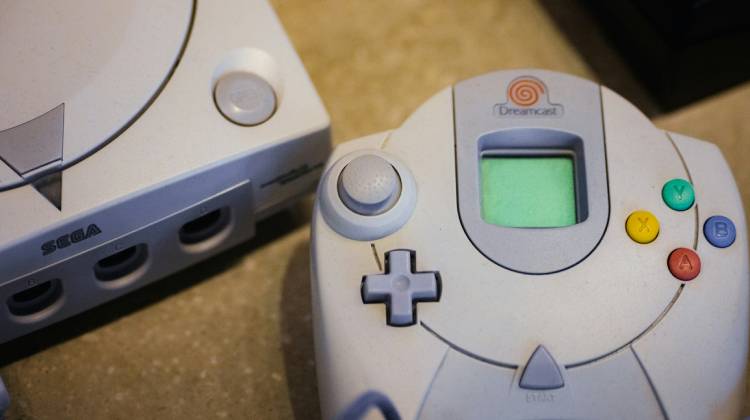
Although Sega discontinued the Dreamcast in 2001, it remains a favourite among retro gaming enthusiasts. Despite facing strong competition from Sony’s PlayStation consoles, the Dreamcast built a loyal fan base and left a lasting mark on gaming history.
Thanks to modern emulation technology, you can now enjoy its classic games on computers and mobile devices. Whether you need the best Dreamcast emulator, a Dreamcast emulator for Android or a Dreamcast emulator for PC, there are several options available to play Sega Dreamcast games on a PC. Let’s explore the best Dreamcast emulators available today.
Best Sega Dreamcast Emulators
1. RetroArch
- Emulates: Multiple gaming consoles and arcade systems.
- Supported Platforms: Windows, macOS, Linux, Android, iOS and selected gaming consoles.
- Download: RetroArch Official Website
RetroArch is one of the most popular emulation platforms, allowing users to play games from multiple classic gaming systems. It supports Sega Dreamcast emulation through the Flycast core, making it a convenient option for gamers who want to enjoy different consoles using one application. This Dreamcast emulator is particularly useful for users who prefer an all-in-one solution.
The software offers several useful features, including controller customization, save states, shaders and graphical enhancements. It is available on Windows, macOS, Linux, Android and other supported platforms. Although beginners may need time to understand its interface, RetroArch provides a flexible gaming experience.
Why choose RetroArch?
- Supports multiple gaming systems.
- Uses the Flycast core for Dreamcast emulation.
- Offers extensive controller customization.
- Includes save states and graphical enhancements.
- Provides a unified interface for retro gaming.
Also read: Best N64 Emulator for Android and PC: 5 Options to Try in 2026
2. Flycast
- Emulates: Sega Dreamcast, NAOMI, NAOMI 2 and Atomiswave.
- Supported Platforms: Windows, Linux, macOS, Android, iOS and other supported systems.
- Download: Flycast Official Website
Flycast is one of the best dedicated emulators for playing Sega Dreamcast games. It is an open-source project that also supports arcade systems such as NAOMI, NAOMI 2 and Atomiswave. As a Dreamcast emulator, its ongoing development helps improve game compatibility, performance and overall emulation quality.
One of its biggest advantages is its support for multiple platforms, including Windows, Linux, macOS, Android and iOS. Flycast also offers features such as high-resolution rendering, save states and controller configuration, making it an excellent choice for both beginners and experienced retro gaming enthusiasts.
Why choose Flycast?
- Dedicated Dreamcast emulation.
- Supports several Sega arcade systems.
- Actively developed open-source project.
- Good compatibility with many classic games.
- Supports multiple desktop and mobile platforms.
3. Redream
- Emulates: Sega Dreamcast.
- Supported Platforms: Windows, macOS, Linux and Android.
- Download: Redream Official Website
Redream is a dedicated Sega Dreamcast emulator designed to provide a simple and convenient gaming experience. Unlike multi-system platforms, it focuses specifically on Dreamcast games. This Dreamcast emulator has a clean interface that makes it easy for beginners to navigate, configure settings and start playing their favourite classic titles.
Redream offers a free version with optional premium features. It supports Windows, macOS, Linux and Android devices. Users can enjoy compatible games with enhanced rendering options, making it a suitable choice for anyone looking for a straightforward Dreamcast emulation experience.
Why choose Redream?
- Simple and beginner-friendly interface.
- Dedicated Sega Dreamcast support.
- Available on desktop and Android.
- Free version available.
- Optional premium features.
4. WashDC
- Emulates: Sega Dreamcast.
- Supported Platforms: Windows and Linux.
- Download: WashDC Official Project Repository
WashDC is an open-source emulator developed specifically for Sega Dreamcast emulation. It is an interesting project for users who enjoy exploring alternative emulators and understanding how older gaming hardware works. This Dreamcast emulator also contributes to the wider retro gaming and emulation community.
Unlike more beginner-friendly options, WashDC may require additional technical knowledge during installation and configuration. It is primarily associated with Windows and Linux systems. Users who are comfortable compiling software and experimenting with emulator settings may find this project particularly interesting.
Why choose WashDC?
- Open-source development.
- Focuses on Dreamcast emulation.
- Useful for technical experimentation.
- Available for supported desktop platforms.
Also read: Best GBA Emulator for Android: Top 10 Apps Compared
5. NullDC
- Emulates: Sega Dreamcast and NAOMI.
- Supported Platforms: Windows.
- Download: NullDC Project Archives
NullDC is one of the older Sega Dreamcast emulators that helped introduce console emulation to PC gamers. It supports Dreamcast games and selected NAOMI arcade titles. Although development has been discontinued, it remains an interesting project for enthusiasts exploring the history of Dreamcast emulation.
The emulator was designed primarily for Windows and offers basic features for running compatible games. However, its outdated development and limited compatibility make it less suitable for modern gaming setups. Users looking for better performance and ongoing support should consider Flycast or RetroArch instead. This Dreamcast emulator is mainly worth exploring for its historical significance.
Conclusion
Despite not being as successful in keeping Sega consoles in business compared to competitors such as Nintendo, Xbox, and PlayStation, the Sega Dreamcast remains popular enough to be emulated. Some of the oldest active emulators date back to 2004.
Choosing the best Sega Dreamcast emulator is tricky, but Flycast and RetroArch seem to be the most popular options. Both are actively developed, support multiple systems, and contain fewer bugs in each version.
Due to being actively developed, performance on lower-specification hardware, including more affordable mobile phones or older laptops/PCs, will be improved. Choosing a Dreamcast emulator that suits your device and requirements will help you enjoy classic games. If you would like to play classic Dreamcast games, we recommend trying one of the above emulators.
FAQs: Dreamcast Emulator
What is the best Dreamcast emulator in 2026?
Flycast, RetroArch and Redream are among the best Dreamcast emulators in 2026. Flycast offers dedicated emulation, RetroArch supports multiple gaming systems, and Redream provides a beginner-friendly experience.
Can I play Sega Dreamcast games on a PC?
Yes. You can play Sega Dreamcast games on a PC using emulators such as Flycast, Redream and RetroArch. They allow you to run compatible Dreamcast games on Windows, Linux and other supported desktop platforms.
Do Dreamcast emulators require a BIOS file?
Some Dreamcast emulators can operate without a BIOS file, while others support or recommend using one for improved compatibility. Requirements depend on the emulator.
Can I use a controller with a Dreamcast emulator?
Yes. Most modern Dreamcast emulators support game controllers, including USB and Bluetooth controllers. You can usually customize button layouts through the emulator settings.






Leave a comment