






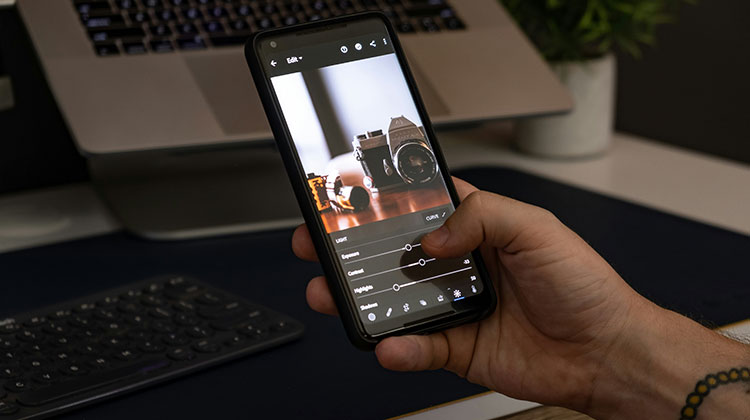
Want to make your smartphone photos look more professional and eye-catching? The best photo editing apps can help you improve color, lighting, sharpness, composition, and overall image quality in minutes. Whether you are a beginner, photographer, or social media creator, these apps offer useful tools for different editing needs.
In this guide, we have selected 10 of the best photo editing apps that combine essential editing controls with creative filters, effects, and advanced features.
Top 10 Best Photo Editing Apps for Mobile Photography
1. Apple Photos
Apple Photos is the built-in photo editor on iPhone and one of the easiest options for everyday editing. It lets you adjust exposure, contrast, highlights, shadows, colors, and other features without installing another app.
If you find the best photo editing apps for iPhone, Apple Photos is convenient because your images are already in the Photos library. It is ideal for quick corrections and simple enhancements rather than complex creative editing.
Key Features
- Exposure and contrast adjustments
- Highlights and shadows controls
- Built-in filters
- Crop and rotate tools
- Color adjustments
- Portrait photo editing
Limitations
- Primarily designed for Apple devices
- Fewer advanced editing tools than dedicated editors
- Limited creative effects and compositing options
Best for: iPhone users who want convenient everyday photo editing.
Also read: Top 10 Private Photo Sharing Apps for Friends and Family
2. Google Snapseed
Google Snapseed is one of the most versatile and best photo editing apps for users who want greater control over their images. It offers professional-style tools while keeping the editing process on mobile devices.
Snapseed supports RAW editing and includes tools for selective adjustments, curves, perspective correction, healing, HDR, and creative effects. It is especially useful for photographers who prefer manual adjustments rather than relying only on presets.
Key Features
- RAW photo editing
- Curves and color adjustments
- Selective editing
- Healing tool
- HDR effects
- Creative filters
Limitations
- Large tool selection can feel overwhelming for beginners
- Fewer templates and graphic-design features
- Not focused on social media content creation
Best for: Users who want advanced editing tools without a subscription.
3. Afterlight
Afterlight is one of the best photo editing apps for users who enjoy film-inspired and vintage photography. It combines traditional photo correction with creative effects and styling tools, making it useful for creating a distinctive visual appearance.
The app includes curves, grain, textures, overlays, frames, and filters. It works particularly well for lifestyle images, social media content, and photos that need a more artistic or analog-inspired finish.
Key Features
- Film-inspired filters
- Curves and adjustment tools
- Grain effects
- Light leaks and overlays
- Double-exposure effects
- RAW image support
Limitations
- Many advanced features require a paid plan
- Large collections of effects may take time to explore
- Less focused on complex professional retouching
Best for: Users who enjoy film-inspired and vintage photography.
4. Darkroom
Darkroom is designed for photographers who want a more advanced editing workflow, particularly within the Apple ecosystem. It works closely with the existing photo library and supports RAW and ProRAW editing.
For photographers who need detailed controls, Darkroom is one of the best photo editing apps for a deeper mobile editing workflow. Its color controls, curves, masking, presets, and batch editing tools make it practical for maintaining a consistent style across multiple photos.
Key Features
- RAW and ProRAW editing
- Curves and color controls
- Masking tools
- Batch editing
- Custom presets
- Non-destructive editing
Limitations
- Mainly suited to Apple’s ecosystem
- Some advanced features require a subscription
- Can be more complicated than necessary for casual users
Best for: iPhone and iPad users who want a deeper photography workflow.
5. Enlight Photofox
Enlight Photofox focuses more on creative image manipulation than traditional photo correction. It allows users to combine images, work with layers, apply artistic effects, and create unusual visual compositions.
It is useful for people who want to turn ordinary photographs into digital artwork. Ready-made creative effects and tutorials can also help beginners experiment with different editing techniques.
Key Features
- Layer-based editing
- Artistic effects
- Creative compositions
- QuickArt effects
- Blending tools
- Glitch-style effects
Limitations
- Advanced features require a subscription
- Creative workflows can have a learning curve
- Less suitable for traditional professional color correction
Best for: Users who want to turn ordinary photos into creative artwork.
6. Prisma
Prisma is one of the best photo editing apps for creating artistic photos. It can turn regular pictures into artwork using different painting and illustration styles.
The app is particularly effective for portraits, landscapes, and images where a strong artistic effect can enhance the overall appearance. Users can also adjust the intensity of many effects.
Key Features
- Artistic photo filters
- AI-powered effects
- Portrait editing
- Background editing
- Creative styles
- Selective editing
Limitations
- Many styles require a premium subscription
- Some effects can look heavily processed
- Not designed for detailed professional color grading
Best for: Users who want artistic and painting-style transformations.
7. Lens Distortions
Lens Distortions add realistic lighting and environmental effects to photographs. It can introduce elements such as sunlight, lens flares, fog, rain, snow, and atmospheric overlays.
Rather than replacing a complete photo editor, it works well as an additional creative tool. It is particularly useful for photographers and content creators who want to give images a cinematic or dramatic appearance.
Key Features
- Lens flare effects
- Light and sunlight overlays
- Fog effects
- Rain and snow effects
- Atmospheric overlays
- Adjustable effect intensity
Limitations
- More focused on effects than complete photo editing
- Some effects require payment
- Excessive effects can make photos look artificial
Best for: Creators who want cinematic lighting and atmospheric effects.
8. VSCO
VSCO is one of the best photo editing apps for photographers and creators who prefer a clean interface and film-inspired presets. It gives users an easy way to develop a consistent visual style across their photographs.
Along with presets, VSCO provides manual controls for exposure, contrast, white balance, color, grain, and other adjustments. This makes it useful for both quick edits and more detailed photography workflows.
Key Features
- Film-inspired presets
- Exposure and contrast controls
- White balance
- HSL adjustments
- Grain effects
- RAW editing on supported devices
Limitations
- Many advanced presets require a paid membership
- The minimalist interface can take time to learn
- Less focused on complex image manipulation
Best for: Photographers and creators who want consistent film-inspired aesthetics.
9. Polarr Photo Editor
Polarr combines standard photo adjustments with selective editing and AI-assisted tools. Instead of changing an entire image, users can make adjustments to specific areas, faces, backgrounds, or colors.
Polarr’s custom filter system is also useful for creators who want to develop a consistent editing style. As one of the best photo editing apps, it offers enough control for detailed photography while still supporting quick and creative edits.
Key Features
- Color and light adjustments
- HSL controls
- Selective masks
- Face detection
- Retouching tools
- Custom filters
Limitations
- Some advanced tools require a Pro subscription
- Extensive controls may overwhelm beginners
- Several premium filters and effects are restricted
Best for: Users who want detailed selective editing and custom filters.
10. Picsart
For social media creators, Picsart is among the best photo editing apps for combining photo editing with graphic design. It is particularly useful for users who want to edit a photo and turn it into a complete visual post.
The app provides filters, stickers, templates, background removal, object removal, text tools, and AI-powered features. This makes it more versatile than a traditional photo editor for creators who regularly produce social content.
Key Features
- AI-powered editing tools
- Background removal
- Object removal
- Filters and effects
- Text and sticker tools
- Creative templates
Limitations
- Many advanced features require a paid plan
- Large feature set can make the interface feel busy
- Some templates and creative assets are premium
Best for: Social media creators, influencers, and users who want editing and design tools together.
Also read: 10 Best Video Editing Software for Beginners to Create Professional Videos
Best Photo Editing Apps Comparison
| App | Best For | Key Features | Free Version | Platform |
|---|---|---|---|---|
| Apple Photos | Quick iPhone edits | Filters, exposure, color, crop | Yes | iPhone, iPad |
| Snapseed | Advanced free editing | RAW, curves, healing, HDR | Yes | iPhone, Android |
| Afterlight | Vintage & film effects | Filters, grain, textures, overlays | Yes | iPhone, Android |
| Darkroom | Advanced Apple editing | RAW, ProRAW, masking, batch editing | Yes | iPhone, iPad, Mac |
| Enlight Photofox | Creative editing | Layers, blending, artistic effects | Limited | iPhone, iPad |
| Prisma | Artistic effects | AI styles, painting effects, creative filters | Limited | iPhone, Android |
| Lens Distortions | Cinematic effects | Light, fog, rain, lens flares | Limited | iPhone, Android |
| VSCO | Film-style photography | Presets, grain, HSL, RAW | Yes | iPhone, Android |
| Polarr | Selective editing | Masks, HSL, retouching, custom filters | Yes | iPhone, Android, Web |
| Picsart | Social media & design | AI tools, templates, background removal | Yes | iPhone, Android, Web |
How to Choose the Best Photo Editing Apps
Choosing the best photo editing apps on your photography style and editing needs. For quick iPhone corrections, Apple Photos is convenient. Snapseed is useful for detailed manual editing, while Afterlight and VSCO are better suited to film-inspired looks.
Darkroom and Polarr offer more advanced adjustments, while Prisma, Photofox, and Lens Distortions focus on creative effects. Picsart is a practical choice for photo editing and graphic design.
Free vs Paid Editing Apps
Many free photo editing apps provide enough tools for everyday adjustments, including cropping, filters, exposure, color correction, and basic retouching. Snapseed is a notable option for users who want extensive editing controls without a subscription.
Other free photo editing apps may offer basic tools at no cost while keeping premium presets, advanced effects, AI features, or larger asset libraries behind a paid plan. Before subscribing, consider whether those extra features are actually useful for your workflow.
What Makes a Good Photo Editor?
A good free photo editor should provide essential controls without making the editing process unnecessarily complicated. Look for exposure and color adjustments, cropping, filters, selective editing, and useful export options.
For advanced users, RAW support, curves, masking, batch editing, custom presets, and AI-powered tools can make a significant difference. The best photo editing apps should balance features, ease of use, and editing flexibility.
Final Thoughts
The best photo editing apps can help you improve smartphone photos without needing desktop software. From simple corrections and professional controls to artistic filters and AI-powered tools, each app offers a different editing experience.
Choose an app based on the features you actually need, whether that means RAW editing, creative effects, quick adjustments, or social media design. The right choice can make your editing workflow faster while helping your photos look more polished and engaging.
FAQs: Best Photo Editing Apps
What are the best photo editing apps for iPhone?
Apple Photos, Snapseed, Darkroom, VSCO, and Afterlight are popular options for iPhone users. Apple Photos is ideal for quick edits, while Snapseed and Darkroom offer more advanced controls. VSCO and Afterlight are better suited for creative filters and film-inspired styles.
Can I edit RAW photos on a mobile phone?
Yes. Apps such as Snapseed, Darkroom, and VSCO support RAW editing on compatible devices.
Which photo editor is best for social media creators?
Picsart is useful for social media creators because it combines photo editing with templates, text, stickers, background removal, and other creative tools.
What are the Best Photo Editing Apps for mobile photography?
Snapseed, Darkroom, VSCO, Polarr, and Afterlight offer different tools for mobile photographers, from basic adjustments to advanced editing.







Leave a comment