






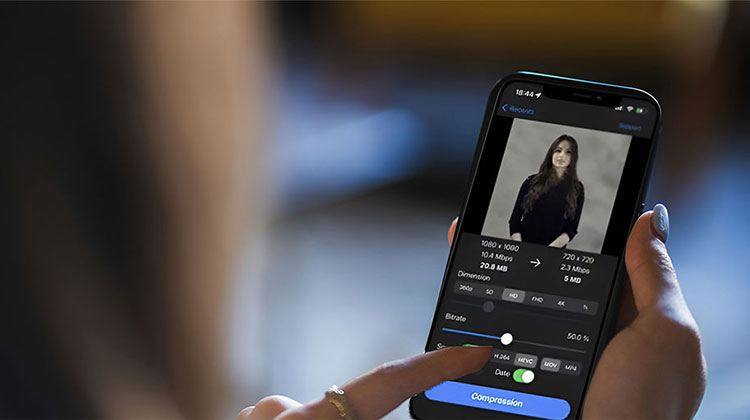
Most of the time, you prefer high-resolution images on your iPhone, which is why it’s difficult to upload images to multiple social media sites or send photos to loved ones. If you’re wondering how to compress your photos on your iPhone, here is a list of the best Photo compressor app for iPhone that are suitable for you.
Why Use a Photo Compressor App on iPhone?
iPhone photo compressor app helps you:
- Save storage space on your iPhone
- Share photos faster via email and messaging apps
- Reduce upload times
- Meet file size requirements for websites and online forms
- Maintain image quality while reducing file size
Let’s look at the top Photo Compressor App for iPhone.
How to Optimize Photo Storage on iPhone Using iCloud
If you’re looking for easy ways to compress photos for your iPhone. These techniques are simple to follow, and the most appealing benefit is that you don’t need to download any app from the store. It is easy to reduce the size of your photos by using iCloud.
- Go to the Settings tab.
- Click the iCloud Photos library.
- Select Optimize iPhone Storage.
At this point, you can compress your photos before uploading them to iCloud, and they can be downloaded for viewing.
Also read: How to Compress Videos on iPhone: 5 Best Video Compressor Apps
Best Photo Compressor App for iPhone
1. Compress Photos & Pictures
It is the most popular iPhone photo compressor app, allowing you to compress images without losing quality. You can download it for free via the App Store. You can use it without a problem. The user interface is simple and easy to use, making it a great choice for novice users.
Key Features
- Adjustable compression levels
- Batch photo compression
- Preview file size before and after compression
- Original photos can be kept or deleted after compression
- Supports JPEG image optimization
Pros
- Very easy to use
- Effective file size reduction
- Batch processing saves time
- Good balance between quality and compression
Cons
- Free version has limitations
- Primarily focused on compression rather than editing
- Advertisements in the free version
2. Photo Compress – Shrink Pics
Photo Compress is a fantastic photo compressor app for iPhone/iPad users. It can offer lossless compression of photos without issue and supports all types of image formats. This is among the most efficient compression speeds. It also supports compressing batches of iPhone images.
Key Features
- Compress single or multiple photos
- Custom image dimensions and resolution settings
- Adjustable compression ratio
- Compare original and compressed images
- Supports direct sharing after compression
Pros
- Fast compression speed
- User-friendly interface
- Custom control over output size
- Batch compression support
Cons
- Limited advanced editing features
- Some premium features require payment
- Interface feels dated compared to newer apps
3. PhotoShrinker
This tool is extremely well-liked by iOS users. It has a simple user interface and doesn’t require any technical expertise. It’s a free photo compressor app for iPhone and can be downloaded directly from the App Store.
Key Features
- Automatic image optimization
- One-tap compression
- Maintains visual quality while reducing file size
- Simple file management
- Storage-saving recommendations
Pros
- Extremely easy for beginners
- Quick processing
- Minimal setup required
- Free to download
Cons
- Fewer customization options
- Limited professional features
- Compression settings are less flexible
4. Resize Image
As one of the most widely used photo compressor apps, “Resize Image” simplifies the resizing process with a variety of preset sizes. It gives users a fast and simple way to convert large images into smaller, more manageable sizes. This makes it ideal to share photos on social media directly via the application.
Key Features
- Custom width and height adjustments
- Preset dimensions for social media platforms
- Image cropping tools
- Pixel and percentage-based resizing
- Save images in different resolutions
Pros
- Excellent resizing controls
- Simple workflow
- Great for social media content creators
- Lightweight application
Cons
- Compression features are limited
- More focused on resizing than storage optimization
- Some features require in-app purchases
5. Pico – Compress Photos
The Pico photo compressor app for iPhone compresses photos and videos, which fixes storage issues on your device and manages data when sharing your media. It provides detailed previews and optimization settings to help you achieve the ideal balance of quality and size. It also provides valuable metadata to your files.
Key Features
- Compress both photos and videos
- Real-time storage savings preview
- Adjustable quality settings
- Batch media compression
- Metadata and file information display
Pros
- Supports photo and video compression
- Helps recover storage space quickly
- Modern and clean interface
- Flexible quality controls
Cons
- Subscription required for advanced features
- Video compression can take time for large files
- Some features unavailable in the free version
Compare the Best Photo Compressor App for iPhone
| App | Best For | Compression Quality | Batch Compression | Video Compression | Ease of Use | Free Version |
|---|---|---|---|---|---|---|
| Compress Photos & Pictures | Overall Performance | ⭐⭐⭐⭐⭐ Excellent | ✅ Yes | ❌ No | ⭐⭐⭐⭐⭐ Easy | ✅ Yes |
| Photo Compress – Shrink Pics | Fast Compression | ⭐⭐⭐⭐⭐ Excellent | ✅ Yes | ❌ No | ⭐⭐⭐⭐ Easy | ✅ Yes |
| PhotoShrinker | Beginners | ⭐⭐⭐⭐ Good | ⚠️ Limited | ❌ No | ⭐⭐⭐⭐⭐ Very Easy | ✅ Yes |
| Resize Image | Resizing Photos | ⭐⭐⭐⭐ Good | ❌ No | ❌ No | ⭐⭐⭐⭐⭐ Easy | ✅ Yes |
| Pico – Compress Photos | Photos & Videos | ⭐⭐⭐⭐⭐ Excellent | ✅ Yes | ✅ Yes | ⭐⭐⭐⭐ Easy | ✅ Yes |
Final Verdict
There are numerous ways to use the internet, and you can quickly learn how to compress photos on your iPhone. These methods are simple to carry out, and you don’t need to install additional programs on your phone. In addition, we present the top photo compressor app for iPhone that converts desired formats and compresses photos easily. The interactive feature in this application makes it simple to use, and the conversion process is fairly quick.
FAQs: Photo Compressor App for iPhone
What is the best photo compressor app for iPhone?
Compress Photos & Pictures is one of the best photo compressor apps for iPhone because it offers batch compression, adjustable quality settings, and an easy-to-use interface. Other popular options include Photo Compress – Shrink Pics, Pico – Compress Photos, and Resize Image.
How can I compress photos on my iPhone without losing quality?
You can use a photo compressor app that allows you to adjust compression levels. Most apps reduce file size while maintaining good image quality. For the best results, choose a moderate compression setting instead of the highest compression level.
Which free photo compressor app is best for iPhone?
Compress Photos & Pictures and Photo Compress – Shrink Pics are the best free photo compressor app for iPhone. They offer basic compression features at no cost, with optional premium upgrades.
How do I choose the best photo compressor app for iPhone?
Look for features such as image quality preservation, batch compression, ease of use, customizable settings, file format support, and positive user reviews when choosing a photo compressor app.








Leave a comment