






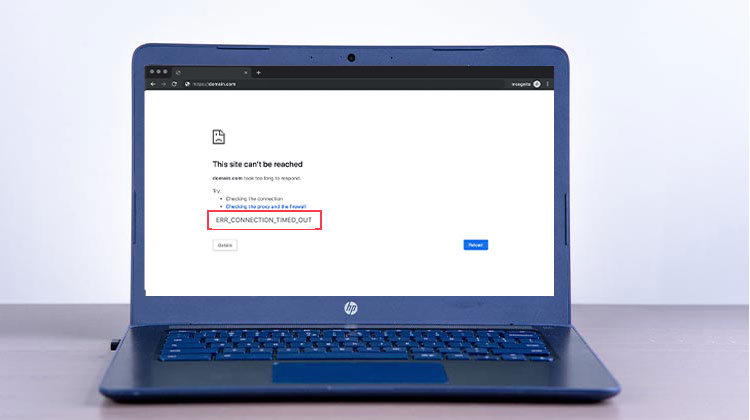
There is nothing more frustrating than racing against a deadline when every second counts, and you see the err_connection_timed_out error in Chrome. Nowadays, the internet is an essential part of our lives, and when you see “err_connection_timed_out” in your browser, it can be a very stressful situation to deal with. At that time, when you are surfing the internet, I understand it.
In this article, I will share what the “err_connection_timed_out” error means, what causes it, and how to fix it. Let’s have a look at this issue.
Why Does the err_connection_timed_out Error Occur?
The err_connection_timed_out error can occur for several reasons, including:
- Weak or unstable internet connection.
- Website server downtime or overload.
- Incorrect DNS settings.
- Firewall or antivirus is blocking the connection.
- Corrupted browser cache and cookies.
- VPN or proxy server conflicts.
Also read: How to Fix ‘Not Enough Memory to Open This Page’ in 6 Easy Steps
How to Fix the err_connection_timed_out Error
1. Check Your Internet Connection
When you see the err_connection_timed_out error in Chrome, check your internet connection. Making sure your internet connection is working properly is vitally important. Most of the time, Google Chrome, Firefox, and Microsoft Edge all let you test the internet connections first. This is more obvious since this is the most frequent error. Here are some steps,
- Cables and Wi-Fi connections. Make sure that all Ethernet cables and Wi-Fi adapters connecting your modem, router, and computer are properly connected.
- You can restart your computer or laptop or mobile device: It will take only a few seconds, but I can assure you that this is a problem that half of users face every day. It is necessary to disconnect the internet, wait a few minutes, and then reconnect it.
2. Clear Browser Cache and Cookies
Data from the browser, including cookies, data, and saved logins, can cause websites that cause the err_connection_timed_out error. Sometimes, clearing the browser history helps us run websites efficiently.
- Open Google Chrome.
- Click on the three dots.
- Click on Settings.
- Then go to Privacy and Security and click on Clear Browsing Data.
- Choose All times,
- click “Clear data”.
3. Disable Proxy Settings or VPN
A proxy server setting, or VPN, is a feature that allows users to set their IP addresses so that websites are accessible, and also caches data from sites to speed up page loading. It acts as a mediator between your computer and the web page you’d like to go to. Sometimes it causes an ” err_connection_timed_out ” unintentionally.
For Windows
- Open the Control Panel and Select Network and Internet.
- Click Internet Options, and open the Connections tab.
- Click LAN Settings.
- Automatically detect settings
- Use the automatic configuration script
- Use a proxy server for your LAN
- Click OK to save changes.
4. Change DNS Settings and Flush DNS Cache
If the issue is again present, try changing your DNS server, as you must refresh your DNS and renew your IP address. These caches keep the IP addresses of websites you visit to ensure that you won’t need to enter them again when you want to return to these websites. As caches age, they can cause a variety of issues. And that leads to an err_connection_timed_out Error. This means you have to flush the DNS cache on your device.
Change DNS
- Start the Control Panel and choose Network and Internet.
- Go to Connected Network and change the DNS settings.
- Most people favor DNS servers such as Google’s Preferred DNS 8.8.8.8 and Alternate DNS 8.8.4.4 that are more reliable.
- Click OK to save the changes, then reboot your PC.
Flush DNS Cache in Windows
- Open Command Prompt as Administrator.
- Run the following command:
ipconfig /flushdns - Press Enter.
- Restart your computer.
This refreshes DNS records and often fixes connectivity problems.
5. Check Your Hosts File
To fix the err_connection_timed_out error, you may need to check and possibly edit your host file. It is the local data that all computers have that is used to map hostnames into IP addresses. But sometimes the host file may block an IP address or URL, which causes an err_connection_timed_out error.
On Windows:
- Open Notepad as an administrator.
- Go to File > Open and navigate to:
C:\Windows\System32\drivers\etc - Open the hosts file.
- Look for any entries related to the website showing the err_connection_timed_out error.
- Remove suspicious entries and save the file using Ctrl + S.
- Restart Chrome and check if the issue is resolved.
Also read: Fix This Site Can’t Be Reached Error – 10 Easy Troubleshooting Fixes
6. Temporarily Disable Firewall and Antivirus Software
Antivirus software or a firewall ensures that devices are secure from unwanted activity and also blocks websites with suspicious content. This extra security can cause issues with your connection from time to time.
- Open Windows Security.
- Select Firewall & Network Protection.
- Temporarily disable the firewall.
- Check whether the website loads correctly.
Additional Tips to Prevent err_connection_timed_out
To reduce the chances of encountering this error in the future:
- Keep your browser updated.
- Regularly clear cache and cookies.
- Update your operating system.
- Use reliable DNS services.
- Avoid installing suspicious browser extensions.
- Scan your device for malware periodically.
Conclusion
“err_connection_timed_out” error occurs mainly with internet and network connections. I’m sure you’ve fully comprehended the problem and the methods to fix the error in this comprehensive article. In case all steps fail, contact your ISP to help you.
FAQs: err_connection_timed_out
What does err_connection_timed_out mean?
The err_connection_timed_out error occurs when your browser cannot establish a connection with a website within the expected time limit. This can happen due to network issues, DNS problems, or server downtime.
Is err_connection_timed_out a server-side issue?
Sometimes. If the website's server is down, overloaded, or undergoing maintenance, the browser may display the err_connection_timed_out error.
How do I know if a website is down or if the problem is on my side?
Try opening the website on another device or network. If the site doesn't load anywhere, the problem is likely with the website server.
Does err_connection_timed_out affect all browsers?
Yes. Although the error is commonly seen in Google Chrome, similar timeout errors can occur in Firefox, Microsoft Edge, Safari, and other web browsers.








Leave a comment