






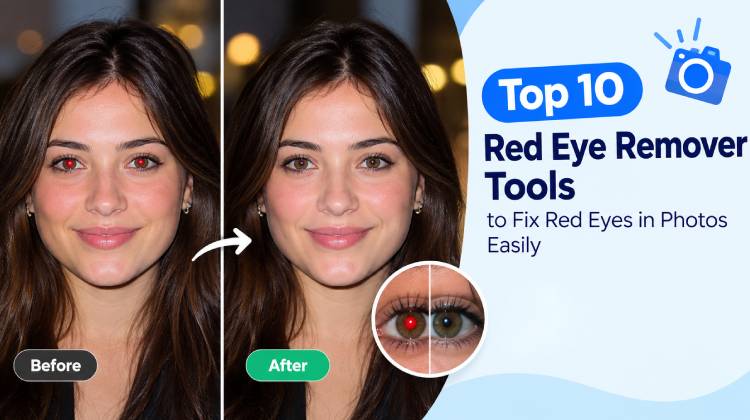
Picture this: you finally get a great group shot — everyone’s smiling, the framing is perfect — and then you zoom in. Two glowing red pupils stare back at you like something out of a horror film. Flash photography strikes again.
Red-eye is annoying, but it’s also one of the most fixable photo problems out there. You don’t need to learn Photoshop or pay for a professional retouch. A handful of online red eye remover tools can sort it out in seconds, and some even let you adjust things by hand if the automatic result isn’t quite right.
We’ve rounded up 10 of the best red eye remover options for 2026 — from instant one-click fixers to full-featured editors and developer-grade platforms — so you can find the one that actually suits how you work.
What Causes Red Eye in Photos?
When a camera flash fires in a dark room, your pupils widen to take in as much light as possible. That flash bounces off the back of the eye and shoots straight back into the lens, creating the familiar red glow in the final image.
It’s not just people, either. Cats, dogs, and other animals often show a similar effect — though their eyes tend to reflect green, yellow, or even white because of a light-sensitive layer behind their retinas.
Red eye remover tools identify that reflection and replace it with a darker, more realistic pupil. Depending on the tool, this happens automatically or with a small manual brush selection.
Why Need a Dedicated Red Eye Remover Tool?
Technically, you can fix red eye in any full photo editor. But if you’ve ever tried to do it manually for twenty photos from a single evening, you know how quickly it stops being fun. These red eye remover tools exist because the fix is mechanical enough to automate — and because most people editing a birthday album don’t want to think about color channels.
A few other reasons they’re worth keeping bookmarked:
- Speed: Most corrections take two or three clicks.
- No prior skills needed: You don’t have to know anything about layers or masks.
- Realistic results: A well-built tool restores the eye without leaving it looking flat or painted.
- Works on pet photos too: Some tools handle non-human eye reflections, not just the classic red variety.
- Available on any device: Browser-based tools work from a phone, tablet, or desktop without needing to install a thing.
Also read: Top 10 Best Photo Editing Apps for Mobile Photography in 2026
10 Best Red Eye Remover Tools
1. Pixelbin AI Red Eye Remover
Pixelbin is probably the best AI red eye remover on this list. Upload a photo, and it automatically scans for red-eye reflections and corrects them — no sliders, no setup.
It covers the most common scenarios: family photos, portraits, group shots, even some pet pictures. The whole process runs in your browser, which is a small but genuine convenience.
Pros
- Beginner-friendly with almost no setup
- Works in any modern browser
- Accepts standard image formats
- Quick enough for single corrections
Cons
- Free downloads may come with limits
- Requires an internet connection
- Tricky photos may still need manual work
Best for: Anyone who wants the simplest possible fix, fast.
2. Media.io AI Red-Eye Remover
Media.io is a solid pick if you’re already juggling enough apps and don’t want to add another one. It handles common photo touch-ups, including portrait improvements, through a browser interface that works on most devices.
The appeal is really about friction — or the lack of it. Open the site, fix your photo, move on.
Pros
- Nothing to download or install
- Handles everyday photo fixes reasonably well
- Accessible workflow for beginners
Cons
- Some features are locked behind a paid plan
- Results can vary depending on photo quality
- A slow connection may cause interruptions
Best for: People who prefer doing everything in the browser.
3. Kaze.ai Red Eye Remover
Kaze.ai takes an AI-first approach and largely handles edits without much input from you. That makes it convenient for casual photos — think birthday parties, holiday snaps, family gatherings.
One habit worth getting into: zoom in on the eyes after processing. Automatic tools occasionally over-correct and leave pupils looking unnaturally dark, which is its own kind of distracting.
Pros
- Minimal effort required
- No desktop software needed
- Good for quick, low-stakes corrections
Cons
- Worth checking the feature list before you commit
- Needs a live internet connection
- Some images may need extra retouching afterward
Best for: Casual editors who want results without fuss.
4. Fotor Red-Eye Remover
Fotor does more than remove red-eye. It’s a full photo editor, which is useful when the eyes aren’t the only thing that needs attention.
Maybe the shot’s a little underexposed, or there’s a distracting object at the edge of the frame. With Fotor, you can address all of that without switching platforms. For regular photo editors, that kind of all-in-one setup makes a real difference.
Pros
- Covers a wide range of editing tasks in one place
- Solid for both portraits and everyday photos
- More flexible than tools built for a single job
Cons
- Advanced features are often paywalled
- The interface can feel overwhelming early on
- Export resolution may depend on your subscription tier
Best for: People who want red-eye correction and a broader editing toolkit.
5. Pixazo Red-Eye Remover
Pixazo is an AI creative platform with image tools among its features. It’s worth a look when you’re comparing options, but confirm that its current offering specifically covers red-eye correction before you upload anything.
Features on platforms like this change fairly often. The only thing that really matters is the result — so after processing, zoom in and check whether the eyes actually look right, particularly in group shots where faces are smaller.
Pros
- Browser-based and accessible
- Mix of AI creative and editing tools
- Can be useful for other image tasks too
Cons
- Feature availability can shift
- Free usage often has limits
- You may need to do additional adjustments
Best for: Users exploring AI image tools more broadly.
6. LightX Red Eye Remover
LightX leans toward the more capable end of the spectrum. It’s a creative photo editor with AI-assisted features built in, which means it’s more useful when a portrait needs several corrections, not just one.
If red-eye removal is your primary goal, just confirm the current version has a dedicated feature for it before diving in. It’s a natural fit for people who already enjoy editing photos and want more control over the outcome.
Pros
- Broad editing capabilities
- Well-suited for portrait enhancement
- Plenty of creative controls to explore
Cons
- Some features require payment
- There’s a learning curve for new users
- Red-eye-specific functionality is worth verifying
Best for: Regular editors looking for an all-purpose photo tool.
7. insMind Red-Eye Remover
insMind is an online AI red eye remover, which keeps the barrier to entry low. Once you fix red eyes, its wider creative features let you make other improvements without switching apps.
Before you upload, review the tool description to confirm it covers the type of correction you need.
Pros
- Easy to access online
- Multiple AI editing options available
- Straightforward for beginners
Cons
- Certain tools may cost extra
- Image quality affects the final result
- Very precise edits might be better handled elsewhere
Best for: Beginners who want to experiment with AI photo editing tools.
8. Cloudinary Red Eye Remover
Cloudinary is a fundamentally different kind of tool. It’s an image and video management platform built for developers and tech teams, not a casual fix-it editor for personal photos.
Its real strength is processing images at volume. If you’re running a platform that handles thousands of user uploads, Cloudinary’s API integrations can automate corrections at scale. That said, it typically requires technical setup — this isn’t something you’d point a first-time user toward.
Pros
- Designed for high-volume image processing
- Strong API and developer integration options
- Good for managing large image libraries
- Includes optimization features alongside corrections
Cons
- Far more involved than a consumer editor
- Usually requires a developer to implement
- Pricing depends on usage volume and plan
Best for: Developers and businesses working with images at scale.
Also read: 10 Best Video Editing Software for Beginners to Create Professional Videos
9. Evoto AI
Evoto AI is squarely aimed at professional photographers. Its strength is portrait retouching and efficient batch editing, making it a practical fit for wedding photographers, event shooters, or anyone managing large galleries for clients.
If you’re fixing one photo, it’s genuinely more than you need. But for working photographers dealing with hundreds of images, the AI-assisted workflow can save real time. Check the current feature list to confirm red-eye correction is part of the package.
Pros
- Built with professional workflows in mind
- AI retouching across large batches
- Broader portrait-editing capabilities beyond red-eye
Cons
- Excessive for occasional personal use
- Requires time to learn properly
- Some features likely sit behind a paid tier
Best for: Photographers regularly editing portrait galleries.
10. Zawa Red-Eye Remover
Zawa may appear when you’re comparing AI image tools, but we weren’t able to verify whether it currently offers a dedicated red eye remover or only more general editing features. Check the official site before relying on it for this specific task.
If you only have one or two photos to fix, a simpler tool will probably serve you better. If you’re actively comparing platforms, test the output quality and check how downloading works before deciding.
Pros
- Worth considering as an alternative
- Potentially useful for other creative editing
- Browser-based if the tool is available
Cons
- Red-eye correction needs to be verified
- Feature availability may change
- Free usage may be restricted
Best for: Users open to exploring lesser-known editing services.
How to Choose the Right Red Eye Remover
No single tool is the best choice for everyone. Here are the factors to consider before picking a red eye remover:
- Ease of use: For the occasional snapshot, automatic tools are plenty. If you edit regularly or need precision, something with manual controls will serve you better.
- Output quality: Check whether the corrected pupils look natural. Over-darkened eyes or odd halos around the iris are signs the tool didn’t quite nail it.
- Price: Free plans usually have strings attached — limited exports, lower resolution, or watermarks. Read the terms before processing a big batch.
- Device compatibility: Test that the editor works smoothly on whatever you’ll actually be using, whether that’s a phone, tablet, or desktop browser.
- Privacy: If you’re uploading personal or family photos, spend two minutes reading the platform’s privacy policy to understand how your images are stored.
Final Thoughts
Most red-eye fixes don’t need to be complicated. Red eye remover does the job in under a minute, and if the result isn’t perfect, a full editor gives you room to adjust.
For straightforward corrections, Pixelbin is the easiest place to start. If you also want to crop, brighten, or clean up the rest of the photo, Fotor handles all of that in one place. Professional photographers dealing with galleries will find Evoto AI more suited to their workflow, and developers processing images programmatically should look at Cloudinary.
Whichever you go with, do a quick side-by-side with the original before you save. A good red-eye fix shouldn’t draw attention to itself — just natural-looking eyes and an otherwise untouched photo.
FAQs: Red Eye Remover
What is the easiest way to remove red eyes from a photo?
An online red-eye remover is usually the easiest option. Upload your photograph, apply the correction, and review the result before downloading it.
Are red eye remover tools free?
Some offer free access, but download limits, watermarks, and premium features vary. Check the current terms before using a service.
Do red eye remover tools reduce photo quality?
Most tools can correct red eyes without noticeably affecting the rest of the image. For the best results, save the edited photo at its original resolution when possible.
Are online red eye remover tools safe to use?
Choose reputable tools and review their privacy policies before uploading personal photos. Check whether images are stored, processed online, or deleted after editing.









Leave a comment