






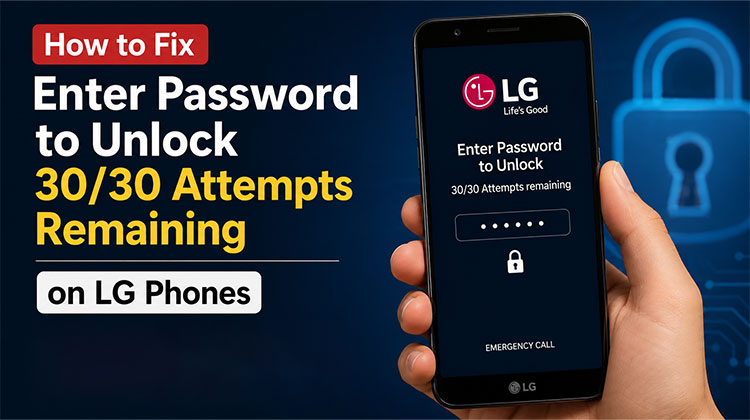
Forgetting the LG phone’s lock code may be a hassle. Unlike many Android phones, LG phones allow you to enter password to unlock 30/30 attempts remaining before locking the phone permanently. Be sure to use these passwords wisely to avoid losing access to the phone.
There are a variety of solutions that can help solve this issue and restore normal operation to your device. This guide will offer easy solutions for the Enter Password to Unlock 30/30 Attempts Remaining” prompt. It will focus on troubleshooting minor issues and more complicated root causes to ensure that you have access again.
What Does “Enter Password to Unlock 30/30 Attempts Remaining” Mean?
It is the primary message you get when the device security system detects multiple unsuccessful attempts to unlock it. This basically indicates that you have 30 more attempts to enter an appropriate password before your device takes further security precautions. It is believed that the ” LG enter password to unlock 30/30 attempts remaining” issue is a result of the “Secure Startup” feature.
Like all security protocols is designed to block unauthorised access to the device. The 30-attempt limit safeguards your phone from brute-force attacks. Each time you make a mistake, the countdown reduces until you’ve exhausted all options. In the end, the phone will be permanently locked or factory reset as the only option.
Why Does “Enter Password to Unlock 30/30 Attempts Remaining” Appear?
Understanding why you are receiving this message on your phone is vital to solving the issue. The error could occur due to various reasons, most often due to an incorrect password or device issues. Below are the most common causes of problems with the ” LG K10 enter password to unlock 30/30 attempts remaining” issue:
1. Forgotten Password
The most likely reason is that users simply did not remember which lock password to use and tried entering the wrong password. This can result in numerous failed attempts, which triggers the countdown to limit incorrect attempts.
2. System Glitches
Sometimes, a software issue or firmware malfunction on the device can cause the error to appear. This can result in persistent password prompts even if the correct password is entered. This can happen following software updates or if the device encounters an unexpected issue.
3. Unauthorized Access
Similar to the wrong attempt, the same thing can happen if someone else tries to guess your phone’s passcode. This happens most often when the phone is used by children, who unintentionally try to unlock it.
Also read: Best iPhone Unlocker: Safest Ways to Unlock Your iPhone
How to Fix Enter Password To Unlock 30/30 Attempts Remaining
If you know the problem that you’re facing, figuring out solutions is a lot easier. There are a variety of practical solutions that will help you solve that ” enter password to unlock 30/30 attempts remaining” problem. Here are the top five solutions that will provide a reliable way to solve the problem regardless of the reason.
Wait Patiently for the Time-Out
Then wait for the timeout to expire before entering the correct password instead of using third-party tools. You may see ” Enter password to unlock 30/30 attempts remaining. Most devices enforce temporary lockouts after repeated unsuccessful attempts to prevent unauthorized access.
When the timeout expires, you’ll have another chance to enter the right credentials. This method requires patience; however, it’s among the most straightforward ways to fix the issue without risk of data loss. But it’s essential to keep in mind that entering incorrect passwords after the timeout can permanently disable the phone.
Use Backup PIN or Password
Another method of unlocking devices is to use your device. Most older LG devices let you use your backup password or PIN as a substitute. This feature is no longer available in the latest models, having been removed by the company. Learn these steps to resolve the issue ” LG enter password to unlock 30/30 attempts remaining” problem:
How to Do It: After waiting for the time-out to expire, you may see an option to enter the backup password or backup PIN. If this is the case, tap it and then enter the correct password or PIN to unlock your LG smartphone.
Use Google Account Details
Certain LG phones allow unlocking by connected Google ID, providing a secure option if the device is not locked. Make sure the phone is connected to Wi-Fi or mobile data, then follow these steps to unlock your LG by using your Google account. You may be able to enter password to unlock 30/30 attempts remaining.
How to Do It: Your phone will offer you the “Forgot Pattern/PIN” option if you are repeatedly trying to use the incorrect password. If it’s there, you can tap it and input the Google account details linked to your mobile. After successful verification, your LG handset will be unlocked for further use.
Factory Reset Your LG Device
When all other options have failed, this is the final alternative to keep the phone in good working order. It will clean the content on your mobile and will permanently lose data. It is therefore ideal for situations when data protection is not a priority. The steps below will help you to solve the ” enter password to unlock 30/30 attempts remaining” problem using a factory reset.
Step 1. Switch off your Android phone and hold the “Power” and “Volume Down” keys for a short time. When you can see the LG logo appearing, then release your “Power” button but keep pressing the “Volume Down button.
Step 2. You can free all keys by clicking the “Factory Reset” or “Factory Data Reset” option on your LG screen. Then, use the volume keys to select “Yes” and confirm the action by hitting the “Power” key. Then, select “Yes” again to erase and unlock your Android mobile phone.
Also read: How to Reset Mac Password: Step-by-Step Guide (2026)
Tips to Avoid This Error in the Future
To prevent getting locked out of your LG phone again:
- Use a password that’s secure but easy to remember.
- Keep your Google account recovery information updated.
- Disable Secure Startup if you don’t need it.
- Store important data in Google Drive or another cloud backup service.
- Avoid repeatedly guessing your password if you’re unsure.
Ending Notes
In the end, encountering an ” Enter Password to Unlock 30/30 Attempts Remaining” error is a major problem. There are a variety of methods to access your device. From using a backup password to resetting the factory, the methods listed below offer various options.
FAQs: Enter Password To Unlock 30/30 Attempts Remaining
Can I unlock my LG phone without losing data?
Yes. If you remember the correct password, use a Backup PIN, or unlock the device through your Google account (on supported models), your data remains safe.
What happens if all password attempts are used?
Depending on the LG model and Android version, the device may require a factory reset before it can be used again.
Does every LG phone show the 30/30 attempts message?
No. This message mainly appears on older LG devices with the Secure Startup security feature enabled.
Can I bypass the '30/30 Attempts Remaining' screen?
There is no official way to bypass this security screen. The safest solution is to enter the correct password, use available recovery options, or perform a factory reset if you've forgotten your credentials.






Leave a comment